



To evaluate a purchase, compare the quantity sold, actual sales amounts and the value of the remaining stock. Review each product item separately. Before reordering, check what has already sold, at what price, and how many units are still in the store.
Assess the result from sold goods and the recovery of the entire cash investment separately. In the example below, sales generated a positive difference between the money received and the cost of the units sold, but receipts had not yet covered the initial purchase.
Define the purchase scope and assessment date
Select one incoming invoice and the date for which you will assess the result. Prepare the quantity purchased, purchase cost, sales information and actual discounts. Do not combine several purchases if your task is to decide what to reorder specifically from this delivery.
- Reconcile the quantity and purchase prices against the supplier's document.
- Check whether all sales up to the selected date have been entered in the records.
- Compare the recorded stock balance with the actual quantity of goods.
- Review prices of completed sales and discounts given.
- Determine whether there were other deliveries of this product, returns or write-offs. If so, do not apply the simplified assumptions in the example below to this purchase.
Record the assessment date alongside the results. For the next review, use the same invoice and a new date. Compare which items sold during that period and how the stock balance changed.
Incoming Invoice Profitability Analysis in Torgsoft
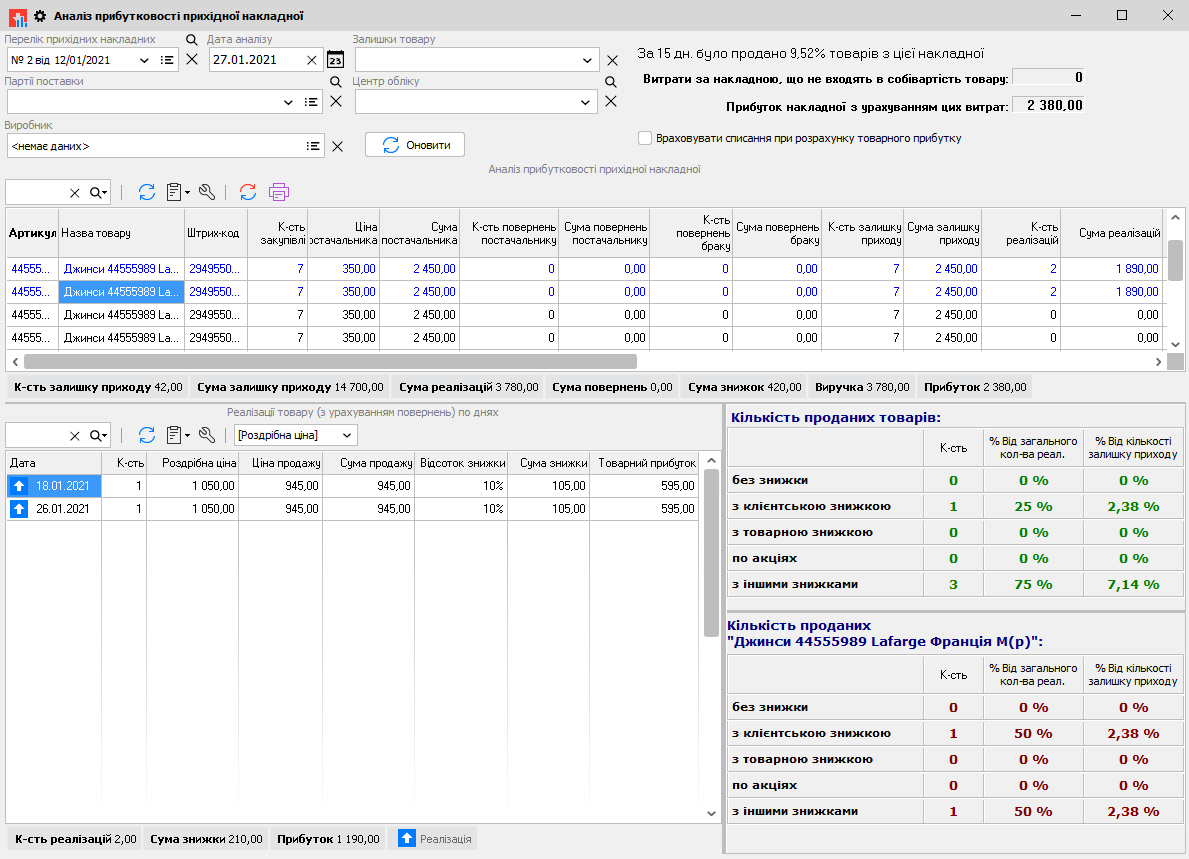
To assess a specific purchase, Torgsoft has the “Incoming Invoice Profitability Analysis” report. It shows sales of goods from the selected invoice from the date it was created through the specified point in time. For each item, it provides the quantity sold, the remaining stock and its value at purchase prices. The purpose of the report is described in the article on analyzing a specific purchase.
The report also shows the amount and percentage of discounts granted for each product, as well as the profit from each product after accounting for its cost. In the lower part of the window, you can view a breakdown of sold goods: date, quantity and sale price. Use this data to compare sales of individual items and check actual prices. The workflow is described in the report instructions.
Select the incoming invoice in the field labeled «Перелік прихідних накладних» in the Ukrainian interface. Its list displays invoices created at the specified accounting center. After applying the filters, click «Оновити» in the Ukrainian interface. To assess one document, check that this specific document is selected: when a delivery batch is selected, the report covers goods from all invoices in that batch. Decide whether to reorder after checking the stock balance and the terms of the next purchase.
Illustrative example: 60 of 100 units sold
Suppose a store purchased one delivery: 100 units at UAH 200 each. By the assessment date, 60 units had been sold at UAH 300 each, and 40 remained. There is no opening stock, other deliveries, discounts, returns or write-offs. The purchase was paid for in full, and all sales were also paid for. Additional costs, taxes and operating expenses are not modeled in this example.
Markup is the difference between the selling price and unit cost, expressed as a percentage of unit cost. Under the example's assumptions, it is (300 − 200) ÷ 200 × 100% = 50%. The 60 units sold generated UAH 6,000 in profit before the expenses excluded from this example. The remaining 40 units are unsold stock valued at UAH 8,000 at purchase cost.
| What is being assessed | Calculation | Amount |
|---|---|---|
| Initial investment in the purchase | 100 × 200 UAH | 20,000 UAH |
| Receipts from paid sales | 60 × 300 UAH | 18,000 UAH |
| Cost of units sold | 60 × 200 UAH | 12,000 UAH |
| Result from goods sold under the example's assumptions | 18,000 − 12,000 UAH | 6,000 UAH |
| Unsold stock at purchase cost | 40 × 200 UAH | 8,000 UAH |
| Difference between investment and receipts | 20,000 − 18,000 UAH | 2,000 UAH |
For the 60 units sold, the difference between sales revenue and cost is UAH 6,000. At the same time, the store spent UAH 20,000 on the entire purchase and received UAH 18,000 from sales. Therefore, as of the selected date, receipts are still UAH 2,000 less than the initial investment.
Separately, 40 units remain, valued at UAH 8,000 at purchase prices. Do not add this amount to the money received: in the example, these units have not yet been sold. Use purchase cost to value them, and consider future sales separately.
Check the effect of the actual discount
Consider a separate illustrative sale of one unit with the same cost of UAH 200. At a price of UAH 300 without a discount, the result is 300 − 200 = UAH 100. If a 5% discount is given, the customer pays UAH 285: 300 − 300 × 5%.
Under these conditions, the result per unit is 285 − 200 = UAH 85. The discount reduced it by UAH 15. This sale is not included in the previous table.
Before discounting remaining stock, calculate the result at the proposed price. For evaluating completed sales, use the actual prices. Do not use the original price of UAH 300 in the calculation for a sale made at UAH 285.
Make a decision for each item
- Planning to replenish stock. Review sales dates and quantities, check the current stock balance and the next delivery lead time. Record the quantity to order and the reason for it.
- Some of the product has sold. Compare the remaining stock with sales over the selected period. Before ordering the same quantity again, determine why additional stock is needed.
- No sales. Check whether the product is available for sale, its display and its price. After checking, decide on the next action: keep the current terms, change the price or postpone reordering.
- Planning a discount. Record the new price and calculate the per-unit result using your own calculation assumptions before launching the offer.
Finish the analysis with a working list: product, quantity sold, stock balance, actual sale price, planned action and next review date. Assign someone to handle the order or price change. On the next date, compare new sales and stock balance with the previous record.


 Go back to the previous step