


From incoming funds to a verified order
A customer transfers money to an IBAN or card. The manager needs to see the incoming payment, identify the order it relates to, record the payment, and send the goods for dispatch. When there are many payments, constantly switching between the bank and the accounting system makes this work harder.
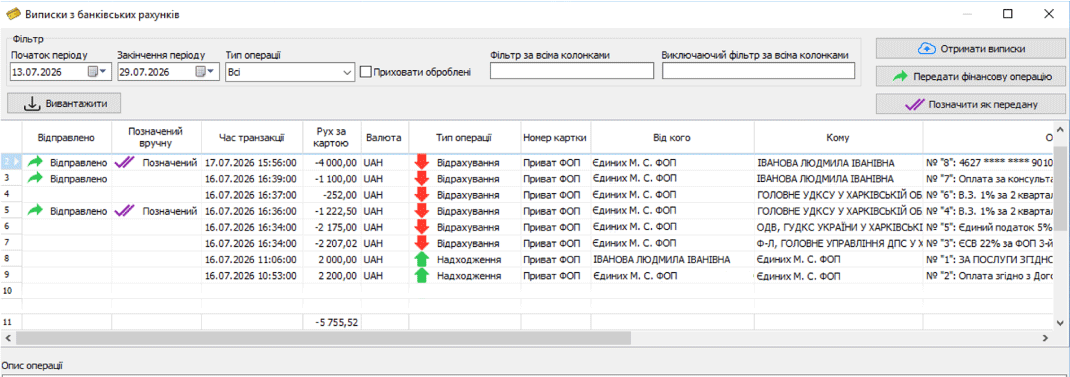
The additional “Bank Statements” option retrieves account transactions from Privat24 for Business, monobank, and Ukrsibbank in Торгсофт. Employees can view statements in the program within the access rights assigned to them.
Prepare accounts and employee access
Before retrieving statements, set up the bank integration and add the users who will monitor transactions. For each account, you can grant access to incoming payments only, outgoing payments only, or all transactions.
For example, a manager who checks order payments should have access to incoming payments only. An employee responsible for expenses should have access to outgoing transactions. Set permissions according to each employee’s tasks.
Requirement for Ukrsibbank
Retrieving statements requires authorization through UKRSIB business. Decide who will handle it: for this bank, viewing transactions in Торгсофт does not eliminate the need to authorize through the bank’s website.
How to organize daily payment checks
Retrieve transactions for a period
You can download a statement for a selected period in Торгсофт. Agree on who checks incoming payments before dispatch and who reconciles them at the end of the workday.
Find the payment you need
You can filter statements by incoming or outgoing transactions and apply filters to column data. To match a payment to an order, check the amount, date, payer, and payment description. A matching amount alone may not be enough.
Clarify an unidentified incoming payment
If the buyer did not include an order number, ask them to clarify. For an advance payment, we recommend recording who sent it and which order it should be applied to. Do not mark a specific invoice as paid until this is clarified.
Check previous entries
The statement shows whether a transaction has been transferred to Торгсофт. Before recording a payment, also check whether another employee has already entered it manually. This is especially important when several people handle payments.
We recommend sending an order for dispatch only after confirming that the funds have actually arrived and match the order. Agree on this procedure with managers and warehouse staff.
Reconcile fees and money movements separately
For payments with a bank fee, we recommend checking the payment amount and the bank’s deduction separately. If several stores or businesses use the same account, determine which sale an incoming payment belongs to before recording it in the accounts.
When withdrawing money to the cash register, check both sides of the transaction: the debit from the bank account and the actual receipt of cash. Agree on who confirms each of these events.
Payment to a supplier through PrivatBank
PrivatBank customers can prepare a payment order in Торгсофт and send it to the online banking portal for the account holder to sign. The employee prepares the document; we recommend that the account holder check the details, amount, and payment purpose before signing.
Check the option for your accounts
Start with a list of bank accounts and the employees who monitor payments. You can ask the sales department about connection terms: Telegram @torgsoft_sale or +38 (067) 558 37 84.
 Go back to the previous step