


Card at home — verification by phone
A regular customer has forgotten their plastic discount card. The store already has their phone number and accumulated bonuses, and the customer expects their usual discount. For this situation, Torgsoft offers the additional option “Discount Card Verification via SMS”: the customer verifies the card with a code received on their phone.
Simply stating the number is not enough to verify the card. The cashier enters the code received by the customer into the program, after which the discount can be applied without the physical card. Separate confirmation can also be configured for paying with bonuses.
How to serve a customer without a card
Ask for the phone number
The customer gives the number registered in the store database for their card. The cashier uses this number to find the customer for verification.
Ask for the SMS code
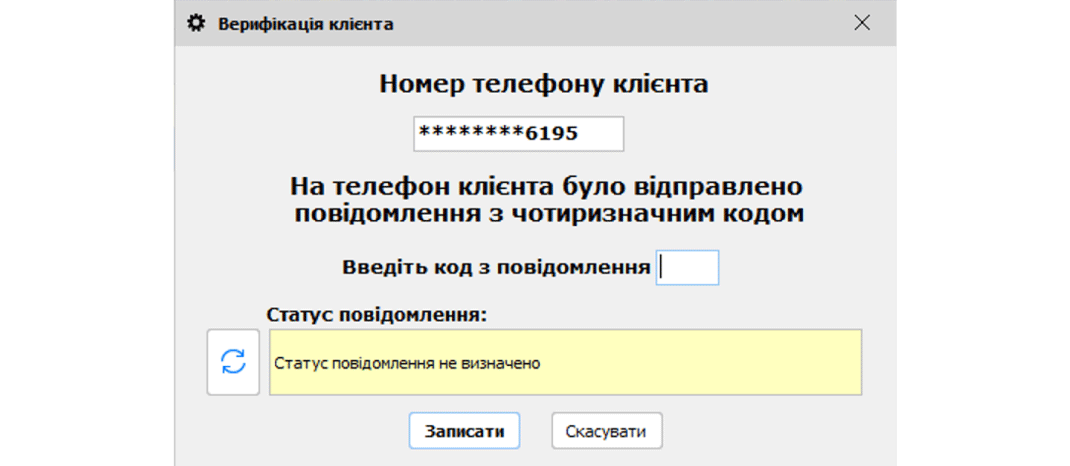
If the customer is found, the program sends them a message with a code. The customer tells the cashier the code, and the cashier enters it in Torgsoft.
Apply the customer’s terms
After the correct code is entered and the “Save” button is clicked, the customer’s details are added to the sale. The customer can receive a discount without a plastic card. Customer verification can also be used during a return.
Explain this process to sales staff before they start using it. For example, when a customer says, “I left my card at home,” offer phone verification and briefly explain why the code is needed.
Bonus redemption requires separate confirmation
If a customer wants to pay for part of a purchase with accumulated bonuses, you can enable an additional check. When this setting is active, after the number of bonuses is specified and the “Pay” button is clicked, the program sends a code to confirm their redemption. Redemption will not take place without the correct code. If bonus redemption has already been confirmed for the same customer within the same document, no new message is sent for another redemption within that document.
For example, a customer first verifies their card for a discount and then decides to use bonuses. If the redemption check is enabled, this action requires separate confirmation. Let the customer know so the second message is expected.
What the owner decides
Confirmation of customer selection during sales and returns, and confirmation of bonus redemption, have separate settings. You can use either check or both.
What to prepare before using it
Sending codes requires the option to be activated, an SMS service to be connected, and a message template. Before launch, check that regular customers’ phone numbers are up to date, and confirm message rates and payment terms with your SMS provider.
We recommend walking the cashier through two scenarios: a purchase with a discount and no card, and payment for part of a purchase with bonuses. Agree in advance on what to do if the customer cannot access the registered phone or the message does not arrive.
The process is simple for the customer: give their number and share the code. For the store, it is important to decide in advance which operations require confirmation and explain this to employees.
Prepare SMS verification for your store
Read about the option or contact the orders department on Telegram @torgsoft_sale. Phone: +38 (067) 558 37 84.
 Go back to the previous step