


Set clear rules for quantity-based pricing
A customer buying one unit expects the retail price. Someone buying a box or ten units of the same product expects better terms. The owner should decide in advance what price they are willing to offer for a larger order.
When a salesperson calculates the discount manually each time, they may make a mistake or offer a lower price than you planned. Start with clear rules: quantity, price per unit, and conditions for applying it. Torgsoft offers the additional option “Wholesale Price Policy.”
Decide at what quantity wholesale pricing begins
To start, choose a few of the most popular products that customers buy both individually and in batches. For each one, assess the purchase cost, selling expenses, and acceptable earnings. A larger quantity alone does not mean that any discount will be profitable.
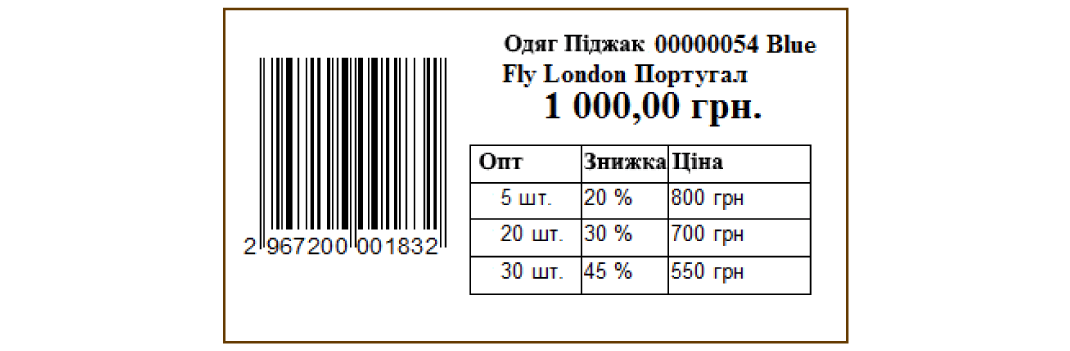
Example thresholds
Up to 4 units — retail price.
From 5 units — first wholesale tier.
From 10 units — next tier.
This is an example to help you prepare your own rules. Set specific prices based on the product’s economics. If you sell by the box, clarify how many units a box contains and which units you use to calculate the threshold. An agreement that pricing starts “from one box” should be equally clear to the owner, salesperson, and customer.
Choose a calculation basis
When preparing prices, you can consider two approaches: a discount from the retail price or a markup on the purchase cost. The first helps explain the difference from the retail price to the customer. The second lets you start the calculation from the cost of acquiring the product.
Calculate the final price using each approach and check whether it covers your expenses. Different products may need different thresholds: terms that work for inexpensive accessories may not suit tools. If a particular store location has different sales terms, record them before setup.
What to check before launch
Prepare a few products
For each, write down two or three clear tiers: the quantity from which you are willing to sell, and at what price.
Clarify the settings
Show the manager examples of products and your preferred rules. Ask them to explain how your specific scenario can be implemented in the program.
Check the tier boundaries
During a test sale, check the quantity just before the threshold, at the threshold, and after it. For the example above, these are 4, 5, 9, and 10 units. Compare the result with the prices you prepared.
Also define terms for regular customers. Volume pricing and a personal discount have different grounds. If you plan to combine them, first clarify the order in which they apply and check the final amount using a specific example.
Discuss your wholesale prices
Prepare a list of products, quantity thresholds, and desired prices. This will make it easier to discuss the option and ask specific questions about setup. Contact the Order Department on Telegram or by phone at +38 (067) 558 37 84.
 Go back to the previous step