



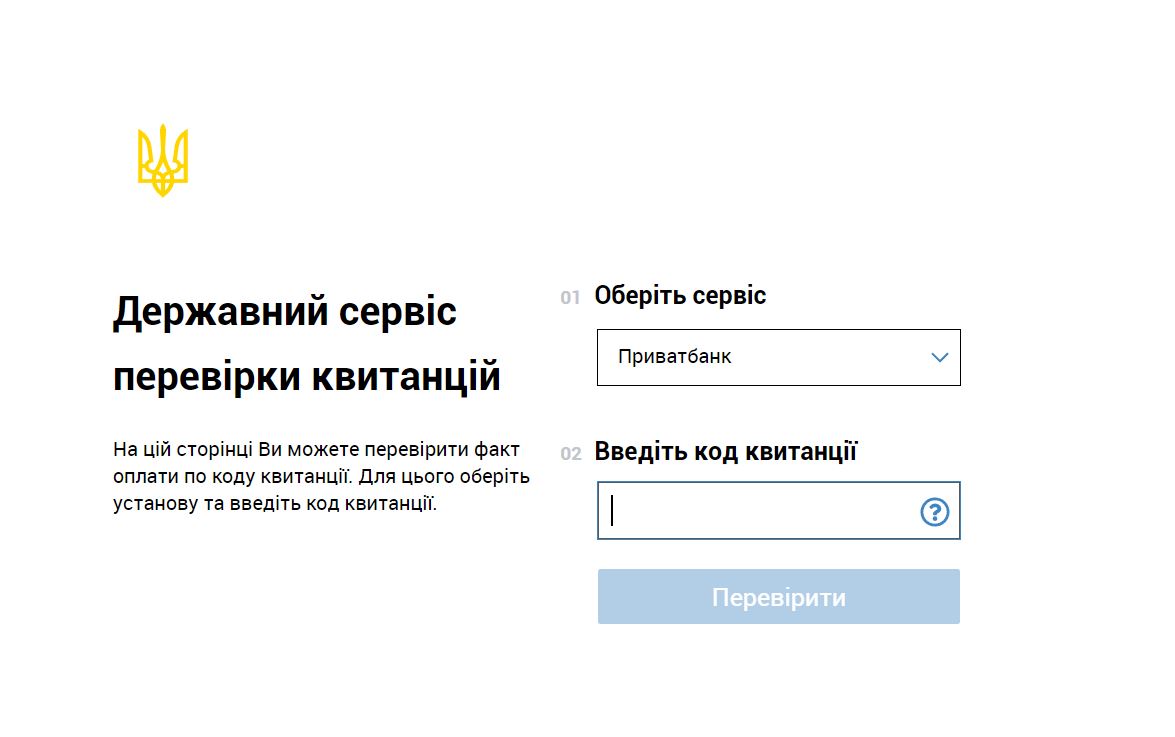
The government service Check.gov.ua is designed to verify receipts by code, including when confirming payment for administrative services. To use it, select the institution that issued the receipt and enter the code shown on the document. If the service returns payment details, compare them with the relevant service and its payment details. If the institution is not listed or the check fails, contact the payment service provider or the institution providing the administrative service before paying again.
For a Ukrainian entrepreneur, verifying a bank receipt, confirming that funds have arrived, and issuing a fiscal receipt are separate actions. Do not release goods under a full prepayment arrangement based only on a screenshot of a receipt or a Check result. First, the responsible employee should match the incoming payment against the seller’s account records. A fiscal receipt must be created and provided to the buyer when required by Ukrainian law.
What to use Check.gov.ua for
In its official announcement about the launch of the Check pilot project, the Cabinet of Ministers of Ukraine described the process as follows: a person provides the code from a receipt for payment for an administrative service, and an employee of the institution checks the payment on the website. This makes it possible to confirm payment without handing over a paper receipt as part of this process. At the same time, the government announcement explicitly preserves the option of using paper receipts.
A practical example for a sole proprietor in Ukraine: after paying for an administrative service through a bank, the entrepreneur saves the electronic receipt and gives its code to an employee of an Administrative Services Center (ЦНАП, the Ukrainian acronym for a center providing administrative services), if this payment can be checked through the service. Before paying, it is advisable to ask the institution how payment can be confirmed. This helps you prepare the required document in advance.
Whether a receipt can be checked depends on the institution and the specific receipt. Do not assume that Check can confirm any transfer to a card, payment by phone number, or utility bill payment. The service’s form must list the relevant institution, and the receipt must have a code that can be used for that specific document.
Which document confirms the action you need to verify
Before entering a document number, identify what you need to find out: whether the bank received a transfer order, whether it carried out the transaction, whether the seller received the funds, or whether a sale of goods was recorded. The answer determines which source to consult.
| Document or information | What it lets you verify | What the entrepreneur should do |
|---|---|---|
| Payment instruction, sometimes referred to in everyday language as a payment order | An instruction to a payment service provider to carry out a transaction. Creating the instruction does not confirm that it was executed. | Check its acceptance and execution status with the bank or other payment service provider. |
| Bank transfer receipt | Information about the transaction and its status, as stated by the institution that issued the document. | Verify the receipt using an available method and compare its details with the payment in question. |
| Fiscal receipt issued by a registrar of settlement transactions (РРО, the Ukrainian acronym) or a software registrar of settlement transactions (ПРРО, the Ukrainian acronym) | The recording of a settlement transaction under the rules for using РРО and ПРРО. | Use the fiscal details and receipt link in the system of the State Tax Service of Ukraine (ДПС, the Ukrainian acronym). |
| Recipient’s account information, including a bank statement | Whether the funds were actually credited to the relevant account. | Match the incoming payment to the order, amount, and payment purpose. |
This distinction follows, among other provisions, from Articles 1, 40, and 41 of Ukraine’s Law “On Payment Services” No. 1591-IX. A payment instruction is an order to carry out a transaction, while the payment service provider separately records its receipt, acceptance for execution or refusal, and execution. Therefore, interpret a status such as “created” or “accepted” according to what it means; do not treat it as confirmation that the seller received the money.
How to verify a receipt through Check
- Get the receipt from the institution through which the payment was made. Save the file from the banking app or another official channel. If you only have an image without a clearly identifiable code, ask the payer to provide the original document or confirm the code with its issuer.
- Open check.gov.ua yourself. Check the address in your browser so that you enter information on the correct government website.
- Select the institution. The form has the Ukrainian labels “Оберіть сервіс” (“Select a service”) and “Оберіть установу” (“Select an institution”). Choose the bank or other provider that issued the receipt, rather than the institution receiving the funds.
- Enter the receipt code. Copy it into the field labeled “Введіть код квитанції” (“Enter the receipt code”), without accidental spaces, and click “Перевірити” (“Check”). Do not substitute a card number, account number, order number, or fiscal receipt number. If the document contains several numbers and you are unsure which one is the code, ask the receipt issuer.
- Review the service’s response. If payment details are returned, compare the recipient, amount, date, and purpose—only the information actually available in the response. If the details you need are missing, ask the payment service provider for confirmation.
Do not assume that every receipt must have a 16-digit code: the service form asks for a receipt code without imposing a universal length requirement. Likewise, do not expect every institution to return the same set of details. A practical test of a successful check is whether you can match the document found to your payment.
Before paying for an administrative service, get the payment details from an official channel of the institution providing it. Check the recipient, account, amount, and instructions for filling in the payment purpose. Verifying a receipt after a transfer will not correct a payment made using incorrect details.
What to do if the receipt is not found or the website is unavailable
An unsuccessful search by itself does not prove that the payment was not made. First, check that you selected the right institution and entered the correct code. If the institution is not listed, do not choose another one with a similar name. Contact the receipt issuer and ask how to verify the document.
If the page does not open, the form will not load, or the check ends with a technical error, use another method to confirm the payment. A technical outage is not grounds to conclude that the service has been discontinued or that the payment is missing.
The following steps can help you trace the funds and reduce the risk of paying twice:
- The payer checks the transaction status with their bank and requests confirmation of execution, including the recipient’s details, amount, and date.
- The payer sends the confirmation to the institution providing the administrative service and asks it to verify receipt of the funds and whether they can be credited to the relevant application.
- If the details were incorrect or the funds did not arrive, the payer agrees on next steps with the bank and recipient. Decide whether a new payment is needed only after the status of the first one has been clarified.
Keep the receipt, the bank’s response, and payment correspondence with the service documents. In your inquiry, include the date, amount, recipient, and transaction identifier shown on the document. Do not share online banking passwords or codes used to confirm logins or transactions.
How a shop can match a payment before shipping goods
For orders requiring full prepayment, it is advisable to set an internal rule: an employee who has checked the incoming funds in the seller’s banking portal or statement must authorize shipment. A receipt sent by the buyer can help locate the transaction, but the shipping decision should be tied to a specific incoming payment. Even a genuine receipt may relate to a different order or recipient.
Example. A buyer orders goods worth UAH 2,400 and sends an image of a receipt for the same amount. The manager checks the shop’s account, finds a UAH 2,400 deposit, and matches it to the order number and payment purpose. If the funds have not arrived or cannot be clearly linked to the order, the manager leaves the payment pending clarification and contacts the buyer and bank.
To prevent one receipt from being used to justify multiple shipments, record the order number, amount, credit date, and bank transaction identifier in your accounting records. If several payments of the same amount arrive on one day, also check the payer and payment purpose. This is a practical recommendation for organizing shop operations, not a separate requirement of the Check service.
When an electronic document can be used without printing
In Ukraine, an electronic document cannot be denied legal effect solely because it is in electronic form. This is provided for in Article 8 of the Law “On Electronic Documents and Electronic Document Management” No. 851-IV. At the same time, Articles 5 and 7 of the Law set requirements for mandatory details and the original of an electronic document. Therefore, an image displayed on a screen alone is not enough to automatically treat it as a valid original.
Article 7 also provides that electronic and paper documents have equal legal force if the author created them with identical information and details. These rules do not impose a general ban on printing receipts. For a specific administrative service, confirm which method of submitting proof of payment is accepted, and keep the electronic file in a form that preserves its integrity and allows it to be opened later, as required by Article 13.
Separate rules apply to settlement transactions for which the use of an РРО or ПРРО is mandatory. Items 1–2 of Article 3 of Law No. 265/95-VR provide for creating and providing a settlement document in paper and/or electronic form, including sending it to a phone number or email address provided by the buyer. A bank receipt and its verification through Check do not replace that document when the seller is required to provide one.
How to send an electronic fiscal receipt in Torgsoft
In Torgsoft, you can set up messages with a link to a ПРРО receipt. According to the official guide “Відправка чека ПРРО” (“Sending a ПРРО receipt”), go to the settings for the additional “Програмний РРО” (“Software РРО”) function and select or create a message template and delivery service. The template can include a link to the fiscal receipt and its fiscal details, so the buyer can open the relevant document in the ДПС system.
To send a receipt by email, configure the email template and mail settings separately; a PDF copy of the receipt is attached automatically. When processing the payment, the employee checks the buyer’s contact details and the send option. For a phone message, the guide says to select the sending checkbox even if the number has already been filled in from the customer card.
The “Не друкувати паперовий чек при електронній відправці” (“Do not print a paper receipt when sending electronically”) setting lets you skip printing if the receipt has been sent to the customer. However, the guide requires printing a paper copy if sending the email fails; this error does not affect the creation and transmission of the fiscal receipt to the tax authority. Use this feature to provide the buyer with a fiscal document, and verify incoming payments against the seller’s bank records.
Sources and legal basis
- Check.gov.ua — government receipt verification service: selecting an institution and entering a receipt code.
- Cabinet of Ministers of Ukraine, “Уряд запустив пілотний проект безпаперових квитанцій Check” (“Government launches the Check paperless receipt pilot project”): the service’s purpose and confirming payment for an administrative service by code.
- Law of Ukraine “On Payment Services,” dated 30 June 2021, No. 1591-IX: Articles 1 and 40–41 on payment instructions, recording their status, and initiating transactions.
- Law of Ukraine “On Electronic Documents and Electronic Document Management,” dated 22 May 2003, No. 851-IV: Articles 5–8 and 13 on details, originals, legal force, and storage of electronic documents.
- Law of Ukraine “On the Use of Registrars of Settlement Transactions in Trade, Catering, and Services,” dated 6 July 1995, No. 265/95-VR: Article 2 and items 1–2 of Article 3 on settlement documents, their creation, and provision to the buyer.
- Torgsoft, “Відправка чека ПРРО” (“Sending a ПРРО receipt”): configuring electronic fiscal receipt delivery and paper copy printing.
See how stock, documents and payments are connected
The Torgsoft demo lets you reproduce typical store operations and review the data used by an accountant.
- Stock movement Record goods receipts, sales, returns, write-offs, transfers and stocktakes.
- Documents, payments and fiscal receipts Compare stock documents, payment methods, balances and linked fiscal receipts.
- Multiple businesses Review how documents, fiscal registers, accounts and reports are separated between sole traders and legal entities.
Try it with your own example
The demo is available for 30 days. During a consultation, you can check whether Torgsoft fits your accounting workflow.
 Go back to the previous step