



A store can create a separate non-fiscal sales receipt with its own logo, contact details, and a message for the customer. A fiscal receipt may also include additional information, and the relative placement of entries in the approved form is recommended. However, when configuring it, you must retain all details required for your particular transaction, the prescribed wording, and the correct amounts. An additional sales receipt does not replace a fiscal receipt when the seller is required to provide one.
First decide which document you are editing, then choose a template for the printer and check sales and returns using the payment methods your store accepts. In Torgsoft, configuring a non-fiscal template and printing documents from a software registrar have separate considerations. Before use, check the layout, the printed copy, and the fiscal document actually generated.
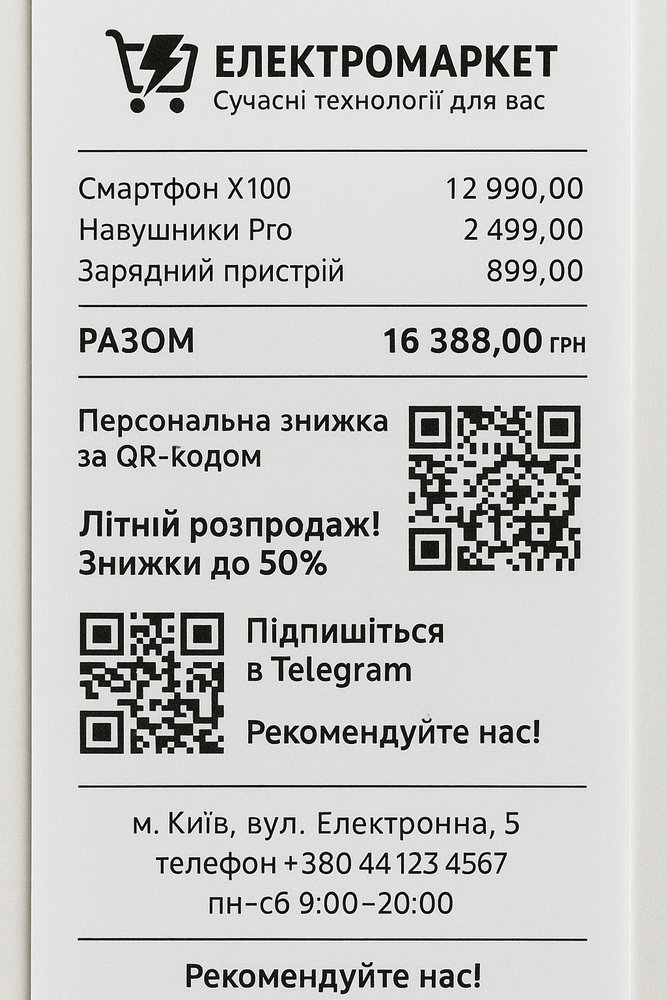
This is an example of advertising design, not a sample of a complete fiscal receipt.
- Determine which receipt you need to format
- What can be changed in the receipt design
- Which fiscal receipt details to check in the layout
- Check the return receipt separately
- How to prepare a useful sales receipt layout
- Configuring a sales receipt template and printing ПРРО documents in Torgsoft
- Check the new design before using it
- Which design mistakes create a risk of liability
- Official legal sources
Determine which receipt you need to format
For a store in Ukraine, the rules for fiscal receipts are set by Ukrainian Law “On the Use of Registrars of Settlement Transactions in Trade, Catering and Services” No. 265/95-VR and the Regulation on the Form and Content of Settlement Documents, approved by Order No. 13 of the Ministry of Finance of Ukraine dated 21.01.2016. The requirements below apply to transactions in Ukraine.
A fiscal receipt is created by a registered registrar of settlement transactions (РРО, Ukrainian abbreviation) or software registrar of settlement transactions (ПРРО, Ukrainian abbreviation). Form No. ФКЧ-1 is provided for sales, and Form No. ФКЧ-2 is provided for paying funds to a customer when processing a return. Printing a fiscal document on an ordinary receipt printer does not, by itself, make it non-fiscal: what matters is that the document is created and registered by the appropriate registrar.
In this article, non-fiscal sales receipt means a separate document listing the purchase and additional store information that is not fiscally registered. The wording “Товарний чек” (“Sales receipt”), a logo, or a resemblance to a cash register slip does not give it the status of a fiscal document.
Under paragraphs 1–2 of Article 3 of Law No. 265/95-VR, a seller subject to the relevant obligation must process the transaction for the full amount and provide the customer with a settlement document in the prescribed form and content, in paper and/or electronic form. Therefore, the delivery of an additional sales receipt should be configured alongside the proper delivery of the fiscal receipt. The grounds for not using an РРО or ПРРО are established by law, including Articles 9–10 of this Law; selecting a non-fiscal mode in the software does not create such grounds. Law No. 265/95-VR, Articles 2–3, 9–10.
What can be changed in the receipt design
Paragraphs 4–5 of Section I of Regulation No. 13 provide for the recommended relative placement of entries and data, and for additional data in РРО and ПРРО documents. Thus, there is no general ban on any additional information in a fiscal receipt. At the same time, these provisions do not guarantee that a particular registrar or its software supports the desired logo, font, or arbitrary web layout.
| Element | Practical way to format it | What must be retained |
|---|---|---|
| Logo and brand name | Add them to the non-fiscal template. For a fiscal document, first check the capabilities of the registrar and editor. | The brand does not replace the seller’s name or the name and address of the business unit. The store logo does not replace the manufacturer’s name or logo image prescribed by the fiscal receipt form. |
| Phone, website, opening hours | Add a short contact block so the customer can contact the store. | An additional contact address or the address of another branch must not replace the required address of the place of sale. |
| Thank-you message, promotion notice, coupon | Keep one clear message. For an offer, specify its validity period and material terms of use. | A notice about a future discount must not change the amount of the current purchase or give the impression that a discount has already been applied. |
| Link through a quick response code (QR code) | If technically possible, add a separate code labeled “Сайт магазину” (“Store website”) or “Залишити відгук” (“Leave feedback”). | The mandatory fiscal QR code must lead to receipt verification. It cannot be replaced with a link to the store. |
| Font, spacing, line breaks | Choose a design for the actual print width and long product names. | All required data and prescribed wording must remain complete and legible. |
Practical recommendation: give the implementer separate instructions for additional information and for retaining the required details. For example: “Add the phone number and message after the main data; retain all required fields, wording, the fiscal QR code, and the manufacturer’s image.” This description makes it possible to check the result against specific conditions. Legal basis: Section I and paragraph 2 of Section II of Regulation No. 13.
Which fiscal receipt details to check in the layout
The list in paragraph 2 of Section II of Regulation No. 13 contains 35 numbered lines. This does not mean that all 35 lines are printed on every receipt. Some depend on the seller’s tax status, the product, the payment method, whether a terminal is connected, and the type of registrar. The numbers below correspond to the regulatory sales form, not to a required number of physical lines on the paper roll.
| Form lines | What to check | When it applies |
|---|---|---|
| 1–3 | Seller’s name, and the name and address of the business unit. | The unit’s name and address must meet the requirements of the Regulation and match the information reported to the State Tax Service of Ukraine (ДПС, Ukrainian abbreviation) on Form No. 20-ОПП. |
| 4 or 5 | Individual value added tax (VAT) registration number labeled “ПН” (“VAT number”), or tax number labeled “ІД” (“Tax number”). | Depends on whether the seller is registered as a VAT payer. In cases provided for by the Regulation where the seller has declined a tax number, the relevant passport details are used. |
| 6–9, 11 | Product name, value, letter designation for the VAT rate; quantity and unit price, codes, and excise details where applicable. | Quantity and unit price are stated if the quantity is not equal to one unit of measure. A code under the Ukrainian Classification of Goods for Foreign Economic Activity (УКТ ЗЕД, Ukrainian abbreviation) and excise details are required in cases established by law. A product barcode may be stated voluntarily outside the mandatory cases. |
| 10 and 28 | Special characteristics of tobacco products and alcoholic beverages; details of the customer’s passport document labeled “РПД” (“Passport document details”). | These lines are provided for duty-free shops selling the relevant products. They do not become mandatory for an ordinary store solely because it sells alcohol or tobacco. |
| 12–17 | Identifying data for the acquirer, merchant, and payment device; commission, if any; transaction type; safely displayed details of the electronic payment instrument labeled “ЕПЗ” (“Electronic payment instrument”); payment system and transaction data. | Completed when payment is made by card through a terminal connected to or integrated with an РРО or ПРРО. The mere fact that a card payment is made through a separate terminal does not, by itself, mean this condition applies. |
| 18–19 | Payment form, amount and currency; payment instruments used. | Line 18 is repeated for each payment form, and line 19 for each instrument used for each form. Paragraph 7 of Section II expressly provides that line 18 is not printed for the “ГОТІВКА” payment form (“CASH”). |
| 20–22 | Total value with the wording “СУМА” or “УСЬОГО” (“AMOUNT” or “TOTAL”) and the corresponding tax data. | VAT is stated for VAT payers; excise or another tax is stated under the conditions in paragraph 2 of Section II. At the same time, paragraph 5 of Order No. 13 provides an exception concerning taxes other than VAT: the requirements for displaying them do not apply to documents from hardware РРО devices whose internal software versions were included in the State Register of Electronic Cash Registers and Computer Systems before this Order took effect. Paragraph 8 of this section allows lines by tax group to be omitted if the VAT or excise tax amount is zero. |
| 23–25 | Rounding, amount due, and change with currency. | Rounding is shown under the conditions of paragraph 9 of Section II for cash payments, in accordance with National Bank of Ukraine requirements. Change is stated for a cash payment. |
| 26–27 | Fiscal document number with the wording “ЧЕК №” (“RECEIPT No.”), and transaction date and time. | The time includes hours, minutes, and seconds. The document number must be distinguished from the registrar number. |
| 29 | Fiscal QR code containing a search request to the Data Accounting System for Registrars of Settlement Transactions (СОД РРО, Ukrainian abbreviation). | The code contains data for finding the receipt. The message authentication code (MAC; shown as “МАС” in the Regulation) in the “mac” parameter of this request is included only for offline documents created by a ПРРО. |
| 30 | Receipt MAC as a separate detail. | Provided for a hardware РРО receipt. Do not confuse it with the condition for the “mac” parameter in the QR code. |
| 31–32 | Mark indicating online or offline operating mode, and control number. | For a ПРРО, state the mode in which the receipt was created; the control number is generated in offline mode. |
| 33–34 | Factory number labeled “ЗН” (“Factory number”) and registrar fiscal number labeled “ФН” (“Fiscal number”) or “ФН ПРРО” (“Software registrar fiscal number”). | The factory number is not stated for a ПРРО. Retain the fiscal number of the relevant registrar. |
| 35 | The wording “ФІСКАЛЬНИЙ ЧЕК” (“FISCAL RECEIPT”) and a graphic image of the manufacturer’s name or logo. | These elements must not be replaced by an advertising caption or the store logo. |
For a connected terminal, the Regulation takes actual interaction into account: the exchange of commands, messages, or data packets. If a customer pays with several electronic payment instruments, lines 16–17 are repeated according to their number. Product lines 6–11 are repeated for different product names; when the quantity is equal to one unit of measure, the product information may be printed on a single line. Check this with a purchase containing many items, since a short sample will not reveal errors in repeated blocks. Regulation No. 13, paragraph 2 of Section I, paragraphs 2–9 of Section II.
How to shorten product names without losing required data
A standard name must reflect the product’s consumer characteristics and identify it unambiguously in the seller’s records. For a narrow paper roll, it is therefore advisable first to remove unnecessary repetition from the name and configure line wrapping while retaining the characteristics the store uses to distinguish products.
The right to use a simplified name belongs to individual entrepreneurs (ФОП, Ukrainian abbreviation) who pay the single tax and are not registered as VAT payers. This exception does not apply to sales of excisable goods; technically complex household goods subject to warranty repair; medicines; medical devices; or the jewelry and household articles made of precious metals and stones specified by law. The simplified name must also reflect consumer characteristics and unambiguously identify the product’s membership in a group under the State Classifier of Products and Services ДК 016:2010, as provided in paragraph 2 of Section I of Regulation No. 13.
The presence of a “Коротка назва” (“Short name”) field in the software does not, by itself, confirm compliance with these requirements. Paragraph 2 of Article 3 of Law No. 265/95-VR.
Check the return receipt separately
When paying funds to a customer for a returned product, use the fiscal cash disbursement receipt in Form No. ФКЧ-2. It has its own numbering of details: the total payout is in line 19, the document number in line 22, the date and time in line 23, and the QR code in line 25. The wording at the end is “ВИДАТКОВИЙ ЧЕК” (“CASH DISBURSEMENT RECEIPT”), together with a graphic image of the manufacturer’s name or logo.
This form also includes conditional details for terminals, taxes, duty-free shops, hardware РРО, and ПРРО. For a ПРРО, state the operating mode and offline control number; do not state a factory number. Line 18 is repeated for each payment form; the Section II rule on omitting this line for a cash payment must not be applied automatically to the return form.
Practical recommendation: prepare separate return samples for cash and card refunds if the store uses both options. Check the transaction or product name, payout amount, taxes, and payment instrument. Apply design changes to templates for future documents; do not edit an already issued fiscal receipt to change its content or design. Regulation No. 13, Section III.
How to prepare a useful sales receipt layout
The sequence below is a practical recommendation for a separate non-fiscal document. Its purpose is to give the customer an understandable purchase list and a convenient way to contact the store.
- Choose the main follow-up action. Decide what the customer should do after the purchase: ask for advice, view the product range, or leave feedback. One short message is enough.
- Set the order of the blocks. Place the store name and document label, date and number, products with quantities and prices, total, contact details, and additional message. Make sure the purchase data matches the accounting system.
- Make the total easy to find. Leave enough space for the amount, and wrap long names so the customer can tell which product each price belongs to.
- Explain where the link goes. Add a label next to a code for the website or feedback form. Check the page on a phone before printing a batch of receipts.
- Specify the coupon terms. If you plan to print an offer for a future purchase, decide in advance on the period, eligible products, and redemption process. Make sure the cashier can apply the printed terms.
- Remove unnecessary content. Keep contact details and messages the store will maintain. Print a bonus balance or personalized discount only if the required data is actually passed to the selected template.
Sample wording: after the total, a store adds “Need advice about your purchase? Find our contact details on the store website” and a separate code linking to the contact page. For a fiscal receipt, consider such a block only after checking that the additional elements are technically supported and that all required details will be retained.
Configuring a sales receipt template and printing ПРРО documents in Torgsoft
Configure the non-fiscal sales receipt in “Налаштування → Параметри → Чек” (“Settings → Parameters → Receipt”). Select a template in the “Шаблон друку чека” (“Receipt print template”) field, then click “Налаштувати” (“Configure”) to open it in the FastReport editor. The official help describes templates for 57 mm and 80 mm rolls and A4 sheets. Select a printer for each workstation; the template selection is stored locally for the user. After preparing the design, check it at every checkout. The help confirms that templates can be edited, but does not establish support for arbitrary web layout or every type of graphic element. Receipt settings.
To use ПРРО, activate the additional “Програмний РРО” (“Software РРО”) function for the required number of workstations. For the current workstation, select the fiscal receipt type, the “Обов’язково для кожної реалізації” condition (“Required for every sale”), the “Програмний РРО” fiscal printer type, and the required registrar. ПРРО documents can be printed on an ordinary receipt printer; the help describes initial setup for 80 mm and selecting 56 mm templates for each ПРРО document through “Налаштування → Налаштування шаблонів друку” (“Settings → Print template settings”).
A 57 mm non-fiscal receipt template should not automatically be treated as the setting for all fiscal documents. After changing print settings, save the configuration and restart Torgsoft for the changes to take effect. For a hardware РРО, check the design options for the particular device and its connection. Adding ПРРО, Configuring ПРРО receipt printing.
Before launch, check taxes and payment instruments: the ПРРО list of available taxes does not automatically determine the tax treatment of each product; that is set in the product type settings. Separate parameters and integration conditions are provided for transferring terminal data. The “Не друкувати паперовий чек” setting (“Do not print a paper receipt”) does not cancel the obligation to provide the customer with a proper electronic document.
You can use test mode for a preliminary check; switching into or out of this mode requires the shift to be closed. Receipts created in this mode are non-fiscal even if they have a number. After testing, check the document from the first live transaction. The help also prohibits changes in the ПРРО editing screen while it is offline. ПРРО operating and testing conditions, Print and data transfer settings.
Check the new design before using it
Save a working copy of the previous template and check the new one on the printer, paper, and workstation the cashier will use. If a preview is available for the relevant document, use it to assess the layout. Make the final assessment after printing and checking the fiscal data.
- Check the width. Names, amounts, tax labels, and numbers are not cut off; the right edge stays within the available print area.
- Check different purchases. Use a long name, several different products, a quantity greater than one, and a fractional quantity if the store sells fractional amounts.
- Check payment. Review cash, card, and mixed payments if they are used. For an integrated terminal, check the applicable terminal details.
- Check returns. Make sure the cash disbursement form and correct payout details are used.
- Check the codes. The fiscal QR code is readable and leads to verification of the relevant receipt; the promotional code has its own clear label.
- Check the actual document. Compare the paper copy with the registered electronic document: seller, products, amounts, taxes, number, time, and payment instruments must match the transaction.
- Check each checkout. The local printer or template selection may differ between workstations.
For a ПРРО receipt created offline, check that it appears on the fiscal server after the connection is restored and the document is transmitted. Separate indicators and control data are provided for this mode. Article 5 of Law No. 265/95-VR sets general limits for offline operation: 36 hours and 168 hours in a calendar month. Paragraph 13 of Section II, “Final Provisions,” allows these periods to be exceeded while a state of martial law or emergency is in effect, or in circumstances of force majeure. This does not cancel the requirements for receipt details or for obtaining a range of fiscal numbers. Article 5 and paragraph 13 of the Final Provisions of Law No. 265/95-VR.
Which design mistakes create a risk of liability
Under paragraph 3 of Section I of Regulation No. 13, a document missing even one detail required for it, or used outside its designated scope, is not accepted as a settlement document. At the same time, errors or inaccuracies in a product name that do not distort transaction information are not, by themselves, grounds for treating the document as a non-settlement document. Therefore, check the completeness and content of the data in the particular receipt.
Paragraph 1 of Article 17 of Law No. 265/95-VR provides for penalties, among other things, for not processing a transaction through the appropriate fiscal registrar, processing it for less than the full amount, or failing to provide the relevant settlement document: 100% of the amount of the sale made in violation for the first violation and 150% for each subsequent violation. Separately, paragraph 9 of that Article provides for liability for using a hardware РРО with changes to its design or software that are not provided for in the manufacturer’s documentation. Therefore, make design changes through the available settings, while meeting the requirements for the device and its servicing.
Paragraph 14 of Section II, “Final Provisions,” provides territorial exemption from liability for specified violations committed from 1 October 2023 in temporarily occupied territories and territories of active or possible hostilities. It applies until the relevant dates marking the end of occupation, hostilities, or the possibility of hostilities, and does not cover violations of settlement procedures when selling excisable goods. To apply this provision, confirm the territory and relevant period using the official list. Without that information, it is not possible to conclude that a particular store qualifies for the exemption. Articles 3 and 17 and paragraph 14 of the Final Provisions of Law No. 265/95-VR.
Official legal sources
- Order No. 13 of the Ministry of Finance of Ukraine dated 21.01.2016, “On Approval of the Regulation on the Form and Content of Settlement Documents/Electronic Settlement Documents…”: the Regulation it approves, Section I, paragraphs 2–5; Section II, paragraphs 1–9; Section III, paragraphs 1–7; Appendices 1–2 with Forms No. ФКЧ-1 and No. ФКЧ-2.
- Ukrainian Law dated 06.07.1995 No. 265/95-VR, “On the Use of Registrars of Settlement Transactions in Trade, Catering and Services”: Article 2; Article 3, including paragraphs 1–4, 11, 14, and 16; Articles 5, 9–10; Article 17, paragraphs 1 and 9; Section II, “Final Provisions,” paragraphs 13–14.


 Go back to the previous step