


Page 26 - Volodymyr Vytyshchenko

Trade Automation Expert at Torgsoft
Volodymyr Vytyshchenko — a trade automation expert at Torgsoft. Implements automated systems in retail outlets. Helps entrepreneurs optimize business processes, automate sales, and accounting.
Specializes in adapting Torgsoft software to the needs of the Ukrainian market. Analyzes business requirements to select the most suitable software and equipment package. Also provides support for the software for online stores and creates online stores in 1 day.
-
22.05.2026
Cash in the cash register: official deposits, withdrawals and error corrections for the upcoming cash register day

How to fix cash discrepancies in Torgsoft, process service cash in or out, and reopen a cash day closed with a future date
-
21.05.2026
Setting up and printing checks in Torgsoft: from sales receipt to fiscal document
How to set up product and fiscal receipt printing in Torgsoft, choose a template, adjust the QR code, and fix print errors
-
21.05.2026
Availability control: how to quickly check stock and prices across the network | Cashier's Guide
How to check stock, prices and sizes across stores in Torgsoft, find products at checkout and prevent negative stock sales
-
21.05.2026
Instructions for setting up integration with Rozetka
The integration allows you to prepare a price list (XML file) with a list of goods and their characteristics, set up automatic synchronization of goods from the Torgsoft program
-
21.05.2026
Draft sales: how not to lose the receipt in case of failures and postpone the sale
How to restore an unfinished sale in Torgsoft, find a draft or unpaid receipt, and avoid duplicate stock write-offs
-
20.05.2026
Scan without failures: quickly find the product and eliminate hardware failures
How to set up a barcode scanner in Torgsoft: remove F7, add Enter after scanning, and find products by item code
-
19.05.2026
Cashier's guide: making a sale, choosing a payment method, mixed payments and avoiding mistakes
How to process a sale in Torgsoft with PECR, choose an entrepreneur, accept cash, card or mixed payment, and fix cashier errors.
-
17.05.2026
How to Set the Date, Time, and Time Zone for Torgsoft
Set the time and Kyiv time zone in Windows on the computer running Torgsoft, then check document dates.
-
15.05.2026
Buyer identification at the checkout: bonuses, VIP clients and verification
How to identify a buyer at the checkout: bonuses, VIP clients, SMS verification, debts and prepayments in Torgsoft
-
15.05.2026
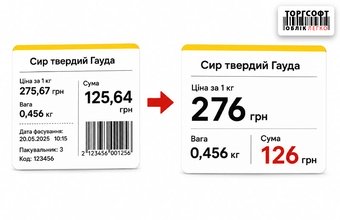
Visual clarity on the price tag: how to round up pennies and hide unnecessary data
How to set up price labels in Torgsoft: hide cents, round prices, create prices ending in nine, and remove extra fields
-
15.05.2026
How to Calculate the Minimum Export Sale Price on a Marketplace and Prepare an Economic Test
Before buying a test batch, consolidate the costs for one order and calculate a price that leaves the desired result after those costs are covered. Then check how that result changes if shipping becomes more expensive or the price falls, and set the test limits.
-
14.05.2026
The database slows down after the initial import: errors in the data, Excel file, and import settings
How to fix Torgsoft database slowdown after bulk import: SQL Express limits, Out of memory, Arithmetic overflow, and index optimization





Torgsoft is a ready-made solution for warehouse, financial, and inventory management for small and medium-sized businesses
 Go back to the previous step