


Send the purchase amount to the terminal without entering it again
The cashier processes the sale in Торгсофт and sees the amount due. If the bank terminal operates separately, the amount must be entered again. A mistake in one digit can cause a mismatch between the sale and the bank transaction.
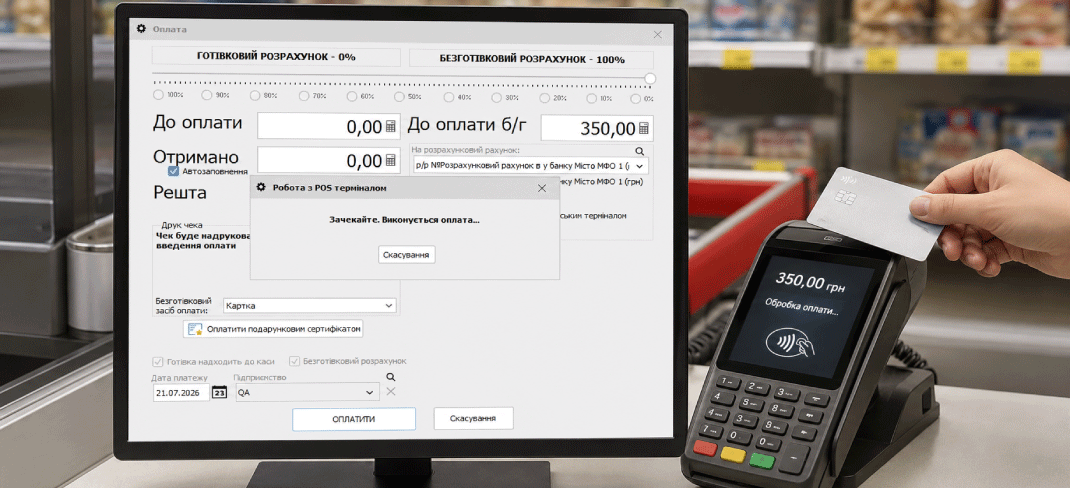
The additional “Integration with a bank terminal” option sends the purchase amount from the software to a connected POS terminal. Before connecting, check the specific equipment and agree with the bank on the terms for using it with the checkout.
Payments and refunds through a connected terminal
Once the connection is configured, Торгсофт automatically carries out the payment transaction on the bank terminal. The cashier does not need to enter the purchase amount on it separately.
The integration also sends refund transactions to the terminal. Check this scenario during setup: it is important to know in advance what to do when a customer returns an item paid for by card.
Ask the bank about the card verification procedure for refunds with your model and protocol. Prepare a short guide for cashiers: which sale details to find, what to check before issuing a refund, and whom to contact if the transaction does not complete.
If several accounts are used at the checkout
In the integration settings, terminal transactions are linked to a settlement account in Торгсофт. One terminal can work with several merchants—payment profiles for entrepreneurs. Their setup on the terminal must be agreed with the bank.
For example, if two entrepreneurs operate at one store, check payment for each profile before launch. Ask the person responsible for setup to explain to cashiers how to select the right account, and verify that the accounts and profiles match.
Pre-launch check: correct entrepreneur → agreed payment profile → corresponding account.
What to prepare before connecting
Gather the terminal details
Confirm the bank, device model and communication protocol with the checkout. Send these details for a compatibility check before activating the option.
Get the components from the bank
Connection requires drivers and libraries for the relevant protocol. Request them from the bank and agree on how the terminal will connect to the checkout computer.
Check the day-to-day scenarios
After setup, test payments and refunds on your equipment. If you use several accounts, include them in the check.
Also ask the bank whether the terminal sends terminal receipt data back to the checkout. If you need this data on your receipt, agree on how to use it and check the result with a sample transaction.
Start by checking compatibility
Prepare the bank name, terminal model and known protocol. Contact the sales department on Telegram @torgsoft_sale or by phone at +38 (067) 558 37 84 to check whether connection is possible.
 Go back to the previous step