


From a new shipment to a customer order
A new shipment of goods has arrived. It needs to be entered into inventory, photographed, and shown to customers. When there are many new items, file transfers, finding the right photo, and answering questions about availability add to the workload.
Organize the work in sequence: first prepare the data and photos, then transfer the assortment to the catalog and check that orders are received. The Torgsoft electronic catalog lets customers browse products and order them through the client app.
Prepare products and photos together
When receiving a shipment, we recommend checking names, models, colors, and sizes. For example, if similar children's sweaters arrive in different colors, prepare separate photos so customers understand exactly which item they are choosing.
Choose a place for photography in advance: even lighting, a neutral background, and a consistent distance from the product. Name files so they can be matched to the right item. This provides a practical basis for working with the photos later.
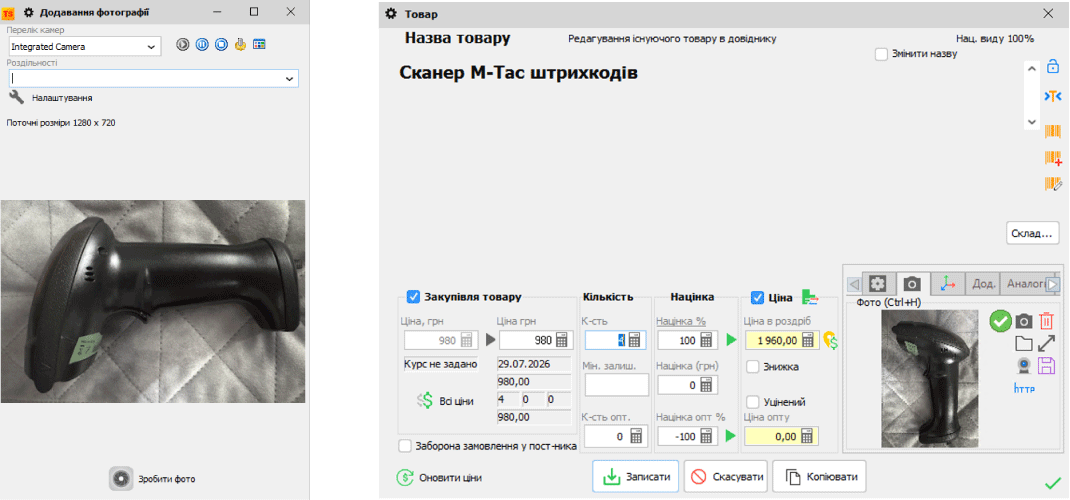
If you plan to take photos near the inventory computer, review the terms of the “Photographing a product with a webcam” option. Before connecting, check whether it is suitable for your workplace.

Check photos before showing them to customers
For the website and catalog, we recommend preparing images with consistent proportions and presentation. Keep the originals separate, and after editing compare the result with the actual product: its color, texture, and important details should remain recognizable.
Start with a few different shots: a light-colored product, a dark one, and an item with complex contours. This check will help you choose a suitable way to prepare the entire shipment. Information about Torgsoft Pixel Perfect is available on the official program page.
Share the assortment with regular and wholesale customers
If customers regularly order new shipments, offer them the Electronic Catalog for Ordering Products. A separate client app is used; the product list and photos are transferred through an FTP server. Customers can browse the assortment and place an order.
Prepare the transfer
The catalog requires settings for the client app and FTP exchange. Agree on these with a specialist before you start working with customers.
Check a test order
Ask one regular customer to order a few items. Check that the names and photos are clear. Separately verify prices and actual availability before confirming.
Receive the order
Orders are downloaded from the server into Torgsoft for processing. The manager does not need to re-enter the list from a message or spreadsheet.
Invoice requirement
To create an invoice for an order, the customer must be registered in the Torgsoft database. If they are not yet registered, first save and register the customer's details.
Start with a small part of the new shipment and one customer. Once you have checked the photos, product transfer, and order receipt, extend this process to the rest of the assortment and customers.
Check the terms for your store
Contact the sales department to discuss photography, preparing images, and connecting the catalog: Telegram @torgsoft_sale or +38 (067) 558 37 84.
 Go back to the previous step