


Every conversation has a next step
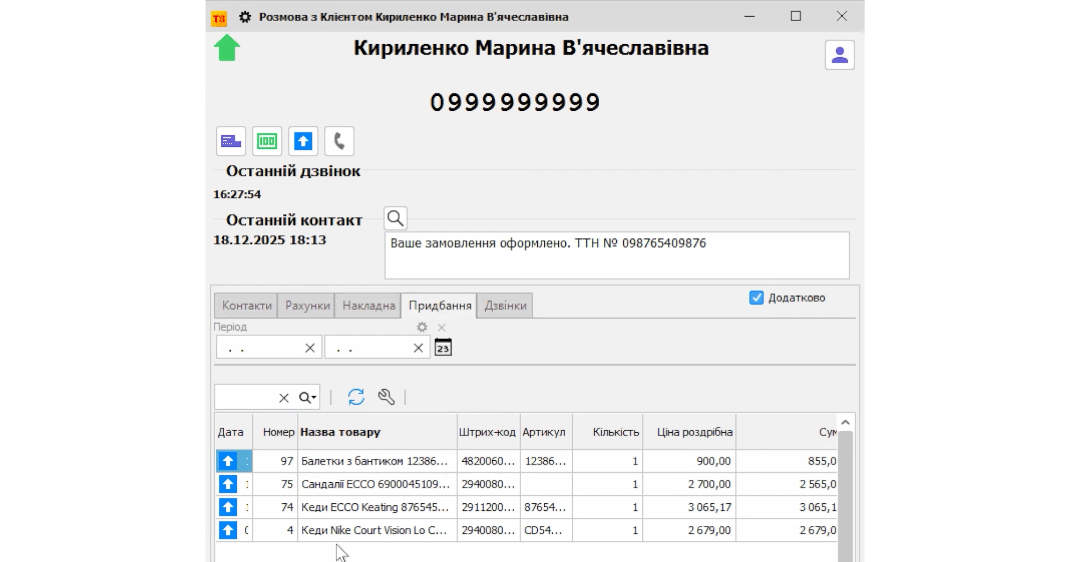
A customer calls to ask about an order. The manager needs to know who is calling, what the customer has bought before, and what was agreed the last time. If a call is missed, it needs to be followed up. If you promised to call back, schedule that action.
Torgsoft offers the additional option “Customer Profile and Binotel Calls.” It supports synchronization with Binotel, working with customer interests, and reminders. For these tools to be useful to your store, agree with employees on how to handle inquiries and pass unresolved matters between shifts.
How to handle inquiries
Agree on a shared workflow with your team. It will be useful both to a salesperson who handles calls alone and to a store with several managers.
Clarify the question
At the start of the conversation, find out the customer's name and which order or product they mean. If this is the customer's first inquiry, confirm the contact details for your reply. Do not rely only on the employee's memory.
Record the agreement
After the conversation, record its gist in the place agreed on by the team: what needs to be done, who is responsible, and when the customer expects a reply. For example: check product availability, send an invoice, or call back about an order.
Follow up on missed calls
Assign an employee to check inquiries that have not received a response. After getting back in touch, record the outcome: the issue is resolved, clarification is needed, or the customer is not responding yet.
Hand over unresolved matters
At the end of the shift, review open agreements. Pass the context and a specific task to the next manager so the customer does not have to explain the whole situation again.
A short note after a conversation
Customer's question → agreement → person responsible → deadline → outcome.
Reminders and the call log
The option adds the ability to work with reminders. Use them for tasks that require following up with a customer: call back, prepare a reply, or check whether the question is still relevant.
Once the option is activated, the call log becomes available. For teamwork, set a time to review phone inquiries and assign someone to follow up. Also agree on how to check that promises have been fulfilled: recording a task alone is not enough; a clear outcome is needed.
How to use customer interests
In Torgsoft, you can link customer interests to product types and fill them in manually or automatically based on purchases. This provides a basis for preparing relevant personalized offers.
Start with a few clear interests that match your product range. Before making an offer, check that it really relates to the customer's needs. A practical approach is to identify the audience and message first, then choose how to get in touch.
What to agree on with the team
Agree where to record the outcome of a conversation, who follows up on missed inquiries, and how to hand over unfinished tasks. Follow this process consistently: the software's features help organize the work, while employees remain responsible for keeping their agreements.
Prepare the option for your store
Review the option description and discuss with the sales department the terms for connecting and configuring Binotel for your store. You can get in touch on Telegram @torgsoft_sale or by phone at +38 (067) 558 37 84.
 Go back to the previous step