


Give customers the option to gift a choice
A customer wants to give a gift but does not know the recipient’s size, colour, fragrance or preferred model. Offer a certificate for a set amount: the customer pays for it now, and the recipient chooses a product later.
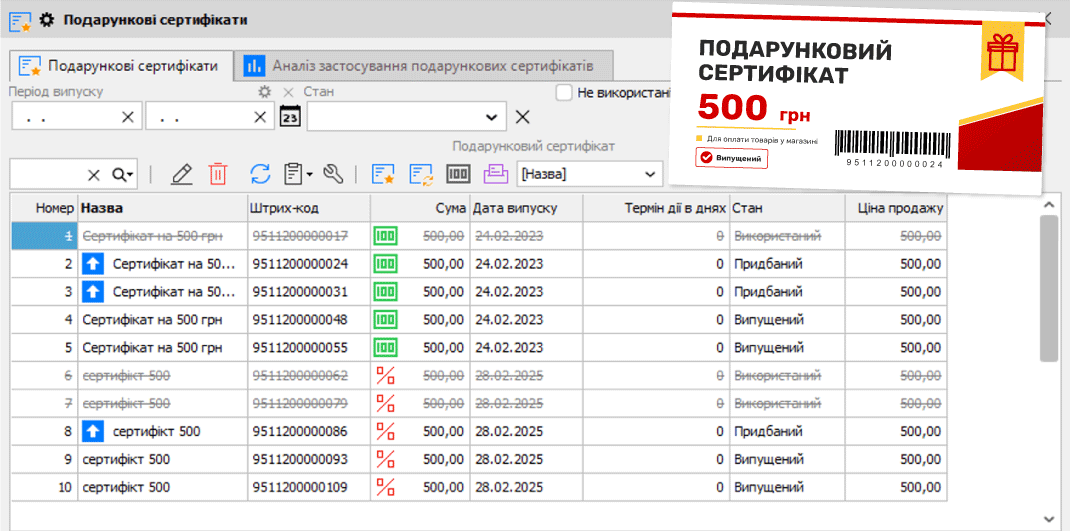
The additional “Gift Certificates” option in Torgsoft lets you issue certificates with barcodes, sell them and accept them at checkout. Before launching, set the terms for customers and prepare your sales staff.
What to decide before your first sale
Choose values that are convenient for your product range. For example, a certificate from a clothing store lets someone gift an item without guessing the size, while a perfume store can leave the choice of fragrance to the recipient.
In Torgsoft, you set the certificate amount and validity period when issuing it. Decide in advance how long the recipient will have to make a purchase, and state this condition on the card or in an information leaflet.
For a chain that operates through a terminal server, you can specify which stores will accept certificates. This is an important condition: according to the help documentation, certificate information is not transmitted through data transmission channels. Do not promise customers they can use a certificate throughout the chain until you have checked how this works in your setup.
From issuing to checkout
Issue the certificates
The program generates barcodes for the certificates. Prepare cards with the chosen value, validity period and clear terms of use.
Sell a certificate
The cashier processes the certificate sale for the customer. Explain which stores accept it, when the product must be chosen, and what happens to any unused balance.
Accept it at checkout
When the recipient chooses a product, the cashier scans the sold certificate’s barcode to process the payment. Torgsoft does not allow a certificate that has already been used to be used again, or a certificate to be used at a store that is not covered by it.
Process the top-up
If the product costs more than the certificate value, the program calculates the difference. The customer can pay the extra amount in cash or by card. Before launching, it is worth checking both options using your store’s setup.
Calculation example
Purchase of UAH 1,300 − UAH 1,000 certificate = UAH 300 top-up.
Remaining balance and reselling the card
A certificate can be used once. If the purchase costs less than its value, the remaining amount is not paid out or carried over to the next purchase. Explain this to sales staff before sales begin, and to the customer before they pay for the certificate.
A used plastic card can be reissued in the program and sold again. There is one exception: certificates tracked “As a product” cannot be reissued. So decide how cards can be reused before having them made.
Agree on the payment procedure before launch
If you are a sole proprietor under the single tax system, discuss this scenario with your accountant before launch. The State Tax Service explains that payment for goods with a gift certificate is non-monetary and does not entitle a sole proprietor to use the simplified tax system. The fact that the option is available in the program does not by itself determine whether this type of payment is permitted for your business.
To get started, prepare a short guide covering the value, validity period, eligible stores, top-ups and the remaining-balance rule. Walk the cashier through selling a certificate and processing a purchase with one to agree on the workflow.
Prepare certificates for your store
Review the option details and contact the order department to discuss activation: Telegram @torgsoft_sale or +38 (067) 558 37 84.
 Go back to the previous step