


From sale to parcel — a manager’s step-by-step workflow
When there are only a few shipments a day, processing them manually is straightforward. As order volumes grow, managers spend more time copying names, phone numbers, cities, branches, and cash-on-delivery amounts, then checking delivery details separately.
In Torgsoft, Nova Poshta and Ukrposhta shipments can be processed from sales documents. This lets you start with a sales invoice that is already prepared. Before dispatch, however, check the recipient, address, and payment terms.
Nova Poshta: create a waybill from a sales invoice
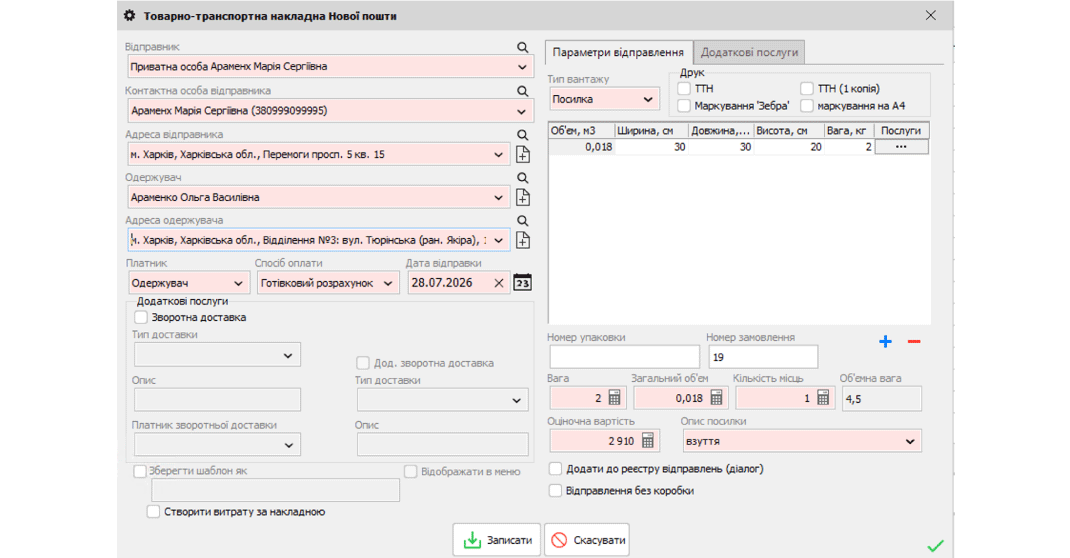
You can create a Nova Poshta waybill from a sales invoice in Torgsoft. If the document already has a contact person and recipient address, those details are populated when you create the waybill.
For example, a customer orders several items for delivery to a branch. Before processing the shipment, check that this is the person who will receive the parcel and that they have not changed the branch since placing the order. Pre-filled details also need to be checked, especially when a customer asks you to send an item to someone else.
Ukrposhta: waybill, label, and delivery tracking
The Ukrposhta integration lets you create a waybill while preparing a sales invoice, print a parcel label, and track the shipment status in Torgsoft.
Recipient details can be filled in automatically if the customer on the sales invoice is already linked to a Ukrposhta recipient. For a new recipient, prepare a current phone number and address. After packing, match the label to the specific box so parcels for similar orders do not get mixed up.
How to organize daily shipment processing
Check the order
Check the items, quantities, recipient, phone number, and delivery destination. For online orders, verify that the information received from the website or marketplace is complete before processing the shipment.
Confirm payment
If the customer pays on receipt, check the agreed cash-on-delivery amount and the arrangement for paying delivery costs. Check orders with partial prepayment separately.
Prepare the parcel
Check the actual weight and dimensions of the packed item. Check the packaging even for typical orders: an additional item or a different box can change the shipment parameters.
Agree on tracking responsibilities
Decide who will check delivery and contact the customer if a parcel is delayed or remains uncollected. For Ukrposhta, you can view the shipment status directly in Torgsoft.
A practical guide is to follow the process from a verified order to a correctly processed parcel. The integration links shipment processing to the sales document, while an agreed workflow helps the manager check all the details in sequence.
Confirm the connection terms
Tell the orders department which carriers you use and where your orders come from. Confirm the terms for connecting the integration you need, and prepare an example of a typical shipment.
Contact us on Telegram @torgsoft_sale or call: +38 (067) 558 37 84.
 Go back to the previous step