


Product locations, tracking for seasonal boxes
In a large warehouse, an employee may know that a product is in stock but not know which shelf to look on. At the end of the season, there is another task: put some of the assortment away, keep a record of what is in each box, and prepare to return the products to sale.
Torgsoft offers two separate options for these tasks: «Product storage location» and «Seasonal packaging and storage of goods». You can combine them so that a box also has a warehouse location.
How employees can find the right shelf
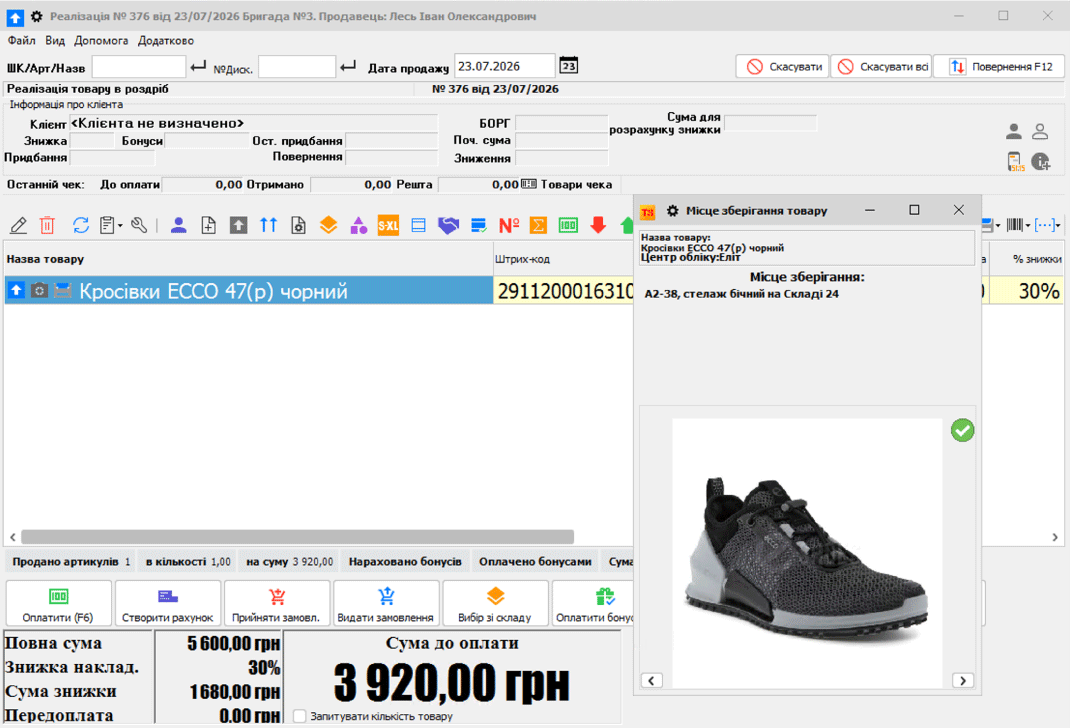
The «Product storage location» option lets you create warehouse locations and link products to them. For example, the owner or storekeeper labels a location «rack 2, shelf 3». Employees can see the saved location in the software and use it to find the product.
If an item is kept in several places, you can specify multiple locations for it. Each accounting center has its own saved locations. These capabilities are available in the mode for working with multiple storage locations.
For a large warehouse, you can create locations in a group and generate barcodes for storage locations. You can view a product’s location during a sale. To print it on a receipt and an issue slip for the storekeeper as well, add the relevant field to the print templates.
How to prepare seasonal assortment for storage
The «Seasonal packaging and storage of goods» option helps you track products in boxes. A practical workflow covers packing, labeling, checking, and returning the assortment.
Pack the products
The employee scans the items being placed in a box. The software records the box contents and creates a deferred internal transfer to the storage warehouse. Once box packing is confirmed in the software, the transfer takes effect.
Label the box
You can print a label and a list of the box contents. Place the label where it can be seen on the shelf, and put the list inside or keep it nearby. During stocktaking, you can select the box by its barcode.
Check the contents
Products in seasonal boxes can be inventoried separately. If you also have «Product storage location» enabled, you can specify a warehouse location for the box—for example, rack 2, shelf 3.
Return the assortment
Before the new season, you can unpack a box and transfer its contents to the required accounting center. Decide in advance which store will receive the products. Before selling a stored item, first process its return from the box.
Agree on warehouse procedures
Label racks and shelves with clear locations, and use the same names in the warehouse and in your records. Decide who packs seasonal boxes, checks their contents, labels them, and returns products to stores. If a box is moved, ask the person responsible to check its recorded location.
Locations make it easier to navigate product placement, while box tracking keeps a record of seasonal assortment. Start by marking one warehouse area and agreeing on a packing procedure, so employees can follow the same rules.
Organize storage in your store
Discuss with the orders department which options your warehouse and seasonal assortment need. Contact us on Telegram at @torgsoft_sale or call: +38 (067) 558 37 84.
 Go back to the previous step