


Keep selling during connection outages
If your store uses a database on a remote server, internet outages prevent the checkout from accessing it. The salesperson needs a prepared way to process purchases on the checkout computer while the connection is restored.
Torgsoft Hybrid is a separate program for users with a Torgsoft Terminal license. It lets you process sales without an internet connection, store transactions locally, and transfer them to the main program once the connection is restored.
What happens to sales
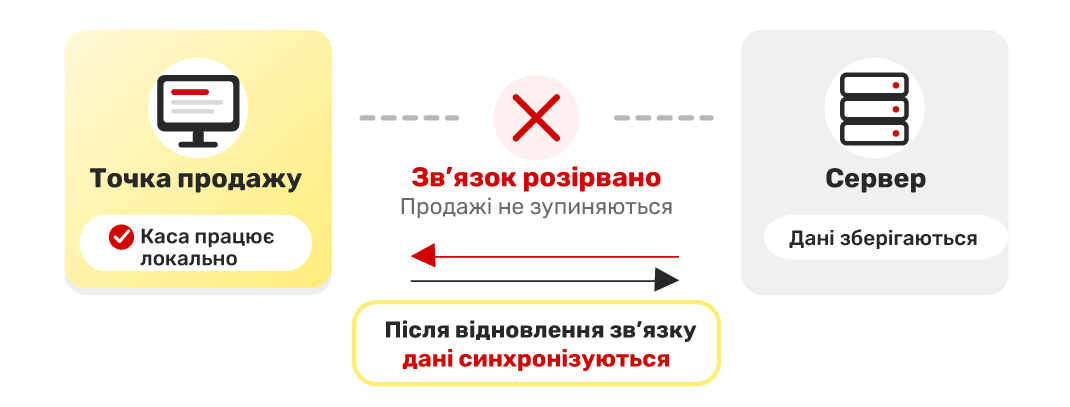
Hybrid is installed on the cashier’s computer. When the connection to the remote server is lost, work continues locally: the salesperson processes sales, and the program saves transactions on the checkout computer.
Once the internet connection is restored, accumulated sales are automatically synchronized with the main Torgsoft program. The cashier and owner do not need to transfer these documents to the server manually.
For example, if mobile service is interrupted at a store location, a prepared checkout can continue making sales with Hybrid. When the connection returns, the saved transactions are sent to the central database. This is an illustrative scenario: the operation of a specific checkout should be tested in advance.
How it works
Sales without a connection → local storage → automatic synchronization after internet service is restored.
What to prepare for outages
Prepare the checkout computer
Install Hybrid before working without internet. Before the first offline sale, you need to process a sale online—this is a requirement for the program to work offline afterward.
Check your workflow
We recommend testing in advance how to process a sale without a connection and how it synchronizes after reconnection. Explain to the salesperson what to do during an outage and whom to contact if they encounter difficulties.
Plan for backup power
If a power outage occurs along with the internet outage, prepare backup power for the checkout computer and the necessary equipment. Check the entire checkout setup, not just the computer.
It is best to finish preparations while the connection is stable: install the program, process the first sale online, and test the workflow with the cashier.
Returns, payments, and equipment
A connection to the server is required to process a return. Creating a return offline is not available in Hybrid. Agree with salespeople on how to explain the next steps to a customer who asks during an outage.
Hybrid supports working with software-based cash registers (PRRO) and fiscal registrars. Separate options for connecting them directly in Hybrid are available.
If you use a bank terminal or electronic scales at the checkout, confirm which integrations your equipment requires before connecting it. Also check that the terminal can connect to the bank: local operation of the checkout program does not, by itself, ensure that card payments can be processed.
Prepare your checkout
For a consultation, let us know that your store database is on a remote server, which checkout stations need to be prepared, and what equipment you use. Contact the orders department: @torgsoft_sale or +38 (067) 558 37 84.
 Go back to the previous step