


To assess the payback of store automation, calculate all the costs of setup and ongoing operation, then compare them with additional cash receipts and actual reductions in payments. Increased revenue, hours freed up for the owner, and lower inventory should be assessed separately: each affects the store’s cash in a different way.
Before buying software, record your accounting metrics, agree on the configuration, and check the required operations using your own products. After launch, compare results across comparable periods. This approach helps you set an acceptable budget and identify which changes actually deliver an economic benefit.
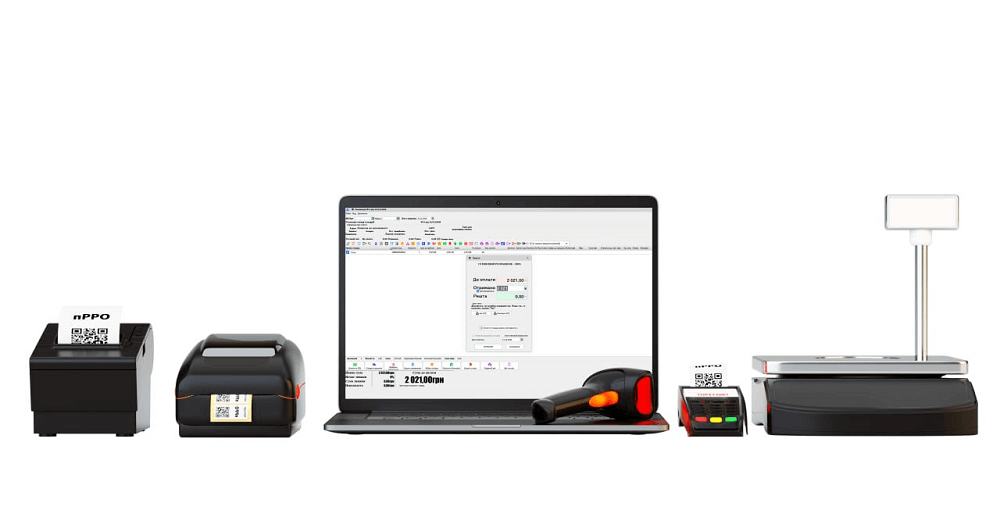
Example of equipment for a shop. The required set depends on the retail processes.
Identify the costs and errors you need to reduce
Start with a specific task assigned to a specific person. For example, a stock clerk spends too long checking deliveries, a sales assistant applies discounts incorrectly, or the owner reorders products that are already in stock. For each problem, record how often it occurs, its financial consequences, and the action automation is expected to change.
A practical approach is to keep a log for four regular trading weeks. If the store has pronounced seasonality or receives large deliveries infrequently, extend the observation period to cover typical operations. A discrepancy by itself does not reveal its cause: a shortage may result from an incorrect opening balance, an unrecorded return, or a receiving error.
| What to measure | What to record before launch | How to check the result |
|---|---|---|
| Receiving goods | Number of items in a delivery, time spent, corrections to quantities and purchase prices | Compare the time spent on the same number of comparable items and the number of confirmed errors |
| Stocktaking | Time required, team composition, discrepancies in quantity and cost | Recheck the same product groups and establish the causes of discrepancies |
| Sales and returns | Incorrect prices, unjustified discounts, cancellations, and correction costs | Compare confirmed losses across the same number of transactions |
| Staff time | Regular hours, paid overtime, and use of contractors | Check which payments actually decreased after the process changed |
| Inventory | Stock at purchase cost, sales, repeat orders, and write-offs | Compare purchasing needs with sales and the availability of the required assortment |
Keep the source for each metric: an invoice, stock count, timesheet, statement, or list of corrections. If you cannot verify a figure, mark it as an estimate and check it during the trial. This helps prevent an employee’s rough estimate from turning into expected monthly savings.
Prepare a complete automation budget
Divide the estimate into one-time costs, recurring payments, and pay-as-needed costs. For each line, record the quantity, useful life, payment date, and person responsible. Mark resources you already have separately: if a suitable computer will remain in use, there is no need to buy it again.
- Licences and workstations. Count the computers used by cashiers, the stock clerk, and the manager who need to work in the software. Check that the chosen format suits local or remote work.
- Paid options and integrations. Confirm whether you need data exchange with an online store, hardware connections, messaging, or other features. For each option, check compatibility, the number of licences, and the term.
- Equipment. Include any computers, scanners, printers, network devices, and an initial supply of consumables you need. Check that existing models are compatible before commissioning any work.
- Data preparation. Allow for cleaning up product names, separating sizes and colours, removing duplicates, checking prices, and transferring directories and opening stock balances.
- Setup and training. Budget for specialists’ paid work, additional staff shifts, and temporary help if they are actually needed.
- Backup and recovery. Plan for backup media or storage, setup, recovery testing, backup power, or connectivity as the store requires.
- Ongoing operation. Record support, time-limited options, subscriptions, additional connectivity, repairs, and consumables. Check the terms for updates separately from the terms for consultations.
When requesting a quote, describe your actual operations: how many tills run at the same time, who receives goods, whether you have a separate warehouse, how returns are processed, and where the manager views the data. Ask the supplier to show which tasks the base licence covers and which require additional payment.
When assessing the investment, count only costs that arise because of the project. At the same time, prepare a complete payment schedule for the store’s cash planning. For example, an unchanged payment for a service already in use remains part of the overall budget but does not increase the additional cost of automation. If the new solution replaces that service, account for the difference in payments and any period when you may have to pay for both.
Which Torgsoft licence should you include in a store budget?
According to the official pricing page, the perpetual Torgsoft-Start licence costs UAH 8,850 for one workstation, and Torgsoft-Ultra costs UAH 17,990 for one workstation. Each computer requires the relevant licence; calculate the budget for multiple workstations according to the terms of the selected configuration. Start includes receiving, sales, returns, write-offs, stocktaking, stock control, and basic reports for one accounting centre. Ultra adds, among other things, multiple accounting centres, stock transfers, supplier orders, wholesale trading, a bonus system, and extended analytics.
Other formats—Terminal or Online—are available for remote work over the internet with a single server database. Limitations are set out in the licence comparison; support for a compatible option does not mean that its purchase is included in the base price.
To check stock in practice, you can use «Склад — Стан складу» (“Warehouse — Stock status”): this form shows quantity, size, price, cost, and discount, and lets you view the movement of a selected product. Configure the columns you need and check products with a zero or negative quantity, as well as prices discounted below cost. Calculate the economic benefit after correcting the causes of discrepancies and changing purchasing or sales. For promotions, the documentation describes a comparative analysis of revenue by product type, with period and accounting-centre selection. Check the required mode in your chosen configuration: calculations based on past sales require you to account for seasonality, product availability, and promotion costs.
The perpetual licence has no subscription fee, and software updates are free. New customers with Start or Ultra for one workstation receive two hours of remote technical support for 30 days. Further consultations and specialist work are charged separately under a service agreement: for example, three hours over 30 days cost UAH 2,990. The package ends when the hours are used or the term expires.
Some options have an annual licence, while rental and Online are valid for the paid period. These terms are explained in the article about support and the total cost of ownership. Before buying, try the 30-day demo, but bear in mind that additional options available during the trial may require separate payment for continued use.
Separate cash benefits from other outcomes
Time savings become cash savings when the store actually reduces its payments. If receiving goods takes fewer hours but an employee’s pay stays the same, monthly labour costs have not decreased. Record the freed-up hours separately and decide what tasks the employee will use them for.
If a process change means the store stops paying for overtime or drops some contractor services, you can include the difference in payments in the cash benefit. Account for the full reduction in payments using the relevant records, and check whether other paid work has taken its place.
The owner’s time also has practical value. The owner can spend it on purchasing, assortment management, or rest. However, multiplying the freed-up hours by a desired hourly rate does not by itself generate cash receipts. If that time produced additional sales, count the verified cash result of those sales, without adding the value of the same hours a second time.
Count additional revenue after related costs. First calculate additional revenue after discounts and returns. If the starting figure already accounts for them, do not subtract them again. From that revenue, subtract the cost of goods sold, payment fees, packaging, delivery paid by the store, advertising, and other related variable payments. Also account for changes in tax payments under the specific Ukrainian entrepreneur’s tax regime. This calculation estimates the management cash benefit and should be reconciled with actual payment dates.
A reduction in inventory shows working capital released separately. If the store sells excess stock and temporarily buys less, cash may remain in the account. However, a lower value of stock by itself is not profit. Check whether the goods have been sold and paid for, whether payments to suppliers have decreased, and whether popular items have gone out of stock.
Avoid counting the same result twice. If a corrected discount has already improved sales results, do not add it again as an “error eliminated.” If lower write-offs have made it possible to reduce purchasing, the two figures may describe the same benefit. Link each amount to a specific transaction and count it once.
Hypothetical example: full investment for one workstation
The example below is hypothetical and does not describe the results of a real store. The owner of a small retail outlet chose one Start workstation. The existing computer is suitable for the job. The store keeps its current fiscalisation solution without changing its payment; no new paid options or integrations are needed in this example. Add their costs for a different configuration.
The estimate uses official licence pricing and one service package. All other amounts are illustrative budget assumptions that should be replaced with quotes from contractors and suppliers in a real project. The owner plans to use the initial free support hours and separately purchase a package for additional work whose scope has been agreed in advance.
| One-time item | Amount, UAH | What it covers |
|---|---|---|
| Start, one workstation | 8,850 | Perpetual base licence |
| Retail equipment | 9,000 | Illustrative budget for a scanner, label printer, and initial supplies |
| Additional setup | 2,990 | Service package: three hours over 30 days |
| Data preparation and transfer | 3,000 | Illustrative separate payment to a contractor for an agreed scope |
| Backup and power | 4,000 | Illustrative equipment budget for backups and operational continuity |
| Additional paid work during launch | 2,160 | Illustrative payment for preparing stock balances and training shifts |
| New paid options and integrations | 0 | Not ordered in the selected configuration |
| Total | 30,000 | 8,850 + 9,000 + 2,990 + 3,000 + 4,000 + 2,160 |
In this estimate, data work, setup, and additional shifts cover different tasks. When commissioning the work, check that two contractors are not charging for the same task. If data transfer is already included in the agreed package, remove or reduce the separate line item.
Additional monthly costs
For this example, the owner has also agreed to the monthly payments below. All amounts in this table are illustrative. Support is provided by an independent contractor under a separate monthly arrangement; it is not a Torgsoft technical support rate. If you need services from Torgsoft specialists, revise the budget based on the packages actually purchased and the periods in which they will be used.
| Additional monthly payment | Amount, UAH |
|---|---|
| Backup storage | 150 |
| Equipment maintenance and additional consumables | 250 |
| Independent contractor services | 400 |
| Additional connectivity | 200 |
| Total | 1,000 |
For simplicity, the example assumes all these payments are made monthly and prices remain unchanged. Over the first 12 months, total additional costs are 30,000 + 1,000 × 12 = UAH 42,000. If selected options or support must be paid for a year in advance, enter the full amount in the relevant month of the payment schedule. An average monthly estimate helps compare options, but it does not show how much cash is needed on the payment date.
Calculate the base and conservative scenarios
All benefits in the following table are hypothetical too. The base scenario assumes that the store has confirmed a reduction in errors and related payments, cancelled some paid overtime, and generated additional sales. The conservative scenario allows for a smaller benefit and no change in the previous level of labour payments.
| Monthly metric | Base scenario, UAH | Conservative scenario, UAH |
|---|---|---|
| Reduction in cash losses from confirmed errors | 1,800 | 600 |
| Payments for overtime cancelled | 1,200 | 0 |
| Result from additional sales after all related variable payments | 3,000 | 1,400 |
| Cash benefit before ongoing operating costs | 6,000 | 2,000 |
| Additional monthly costs | 1,000 | 1,000 |
| Net additional cash benefit | 5,000 | 1,000 |
In the base scenario, illustrative additional sales are UAH 10,000 per month. After UAH 6,000 in cost of goods and UAH 1,000 in other related variable payments, UAH 10,000 − 6,000 − 1,000 = 3,000 remains. In the conservative scenario, the corresponding amounts are 5,000 − 3,000 − 600 = 1,400. The example assumes customers pay and related payments are made in the same month.
In this calculation, the reduction in losses covers transactions other than additional sales. Count it only after checking that the store actually spent less or received more cash as a result of correcting errors. A lower accounting shortage without a confirmed cash impact is not included in this amount.
Suppose the owner also freed up 20 hours a month and values them at UAH 200 per hour: 20 × 200 = UAH 4,000. We do not add this estimate to the base effect of UAH 5,000 because her pay has not changed. Separately, the store released UAH 12,000 once by reducing purchases of excess inventory. This amount may improve the cash balance, but it must not be repeated every month as profit.
Calculate the payback period and check the cash schedule
For a stable positive monthly effect, use the simple formula: payback period in months = one-time investment ÷ net additional cash benefit per month. In our hypothetical example, the base payback period is 30,000 ÷ 5,000 = 6 months, and the conservative period is 30,000 ÷ 1,000 = 30 months.
These results assume that the effect begins immediately and remains unchanged. If the benefit before ongoing costs is just UAH 2,000 in the first month, UAH 4,000 in the second, and UAH 6,000 from the third month onward, net receipts are UAH 1,000, UAH 3,000, and then UAH 5,000 per month. By the end of month seven, the accumulated amount will be 1,000 + 3,000 + 5,000 × 5 = UAH 29,000; by the end of month eight, it will be UAH 34,000. Under this month-by-month plan, the initial costs are covered during the eighth month.
If the net effect is zero or negative, there is no finite payback period. For example, if the benefit is UAH 600 and additional costs are UAH 1,000 per month, the result is 600 − 1,000 = −UAH 400. If these conditions remain unchanged, monthly costs will increase the unrecovered portion of the investment.
For a more accurate estimate, prepare a month-by-month schedule of receipts and payments. Include setup, annual option renewals, support payments, and supplier payment terms. Show any one-time release of working capital from inventory on a separate line with its actual date. This schedule lets you assess regular cash generation against the investment separately from the change in available cash after accounting for working capital.
Introduce accounting in stages and check the results
- Prepare control data. Choose a small, varied group of products and check names, barcodes, sizes, prices, and actual quantities. Record the date and time to which the opening stock balances apply.
- Test the full transaction cycle. Run a test delivery, sale, discount, return, and stocktake. Make sure staff understand how to correct errors and have the agreed access rights.
- Set up recovery. Assign responsibility for backups, decide where they will be stored, and test recovery. Agree on what staff should do if equipment or connectivity is unavailable, according to the store’s configuration.
- Start with the agreed scope. Do not add untested integrations and marketing changes at the same time. Once the core operations are stable, it will be easier to assess the cost and result of each next step.
- Compare like-for-like periods. Account for working days, hours of operation, deliveries, promotions, prices, and seasonal demand. When workloads differ, also compare time and errors per 100 transactions.
- Update the calculation. Replace assumptions with actual payments and verified benefits. Assess the training period separately from months of regular operation.
If the store also launched advertising, changed its assortment, or extended its opening hours at the same time as automation, you cannot reasonably attribute the entire sales increase to the software. Mark these changes in the observation table and, where possible, compare with a similar group of products or a location where the process remained unchanged.
Based on the review, make a specific decision: keep the configuration, adjust the process, change the support package, or postpone an additional option. The decision should be based on a complete estimate, tested operations, and the actual additional cash benefit. If some benefits are not yet verified, continue measuring and plan costs using the conservative scenario.


 Go back to the previous step