


For customer data analysis to help you manage a store, first define a specific question: Why have repeat purchases declined? Is a discount justified? Which products should be reordered? Then set the period, list the stores, and define the customer identification rule. Before calculating anything, reconcile sales, returns, and customer records: errors in this data change the conclusions.
Work with metrics whose formula, source, and limitations are clear. Calculate the share of repeat buyers among identified customers, the average transaction value using receipts, and profitability only when reliable cost data is available. For every conclusion, assign a specific action, a staff member responsible, and a date to check the result.
Define Which Decision the Analysis Should Support
Start with a question the store owner or manager can influence. Grouping customers can help you select data, but a management task requires checking the figures and deciding what to do next.
| Manager’s question | What to check | Next action |
|---|---|---|
| Why are there fewer repeat customers? | Number of identified customers, share of receipts with a customer code, duplicates, product availability, and whether the periods are comparable | Correct the records or investigate the reason for the decline in purchases in a specific category |
| Should we continue the discount? | Revenue after discounts and returns, number of receipts, cost of goods, and gross profit | Review the discount amount, product list, or promotion terms |
| What should we reorder? | Number of units sold and returned, number of customers who bought the product, stock levels, and days when the product was unavailable | Adjust the order based on product availability |
| Where should we check service quality? | Returns, reasons for customer inquiries, and repeat purchases across comparable stores and categories | Review specific transactions, product descriptions, or sales staff performance |
A practical approach is to state the task in one sentence: “Check why the share of customers with two or more purchases per month has declined at Store A.” This wording immediately defines the data needed and the scope of the check.
Prepare Sales, Returns, and Customer Data
It is best to base calculations on records of completed sales and returns. Online store data can help verify order status, customer records can link transactions to the same buyer, and inventory and inquiry records can help investigate possible reasons for changes. Do not count an order from the website and its sale in the accounting system as two purchases.
Prepare the following fields for your working spreadsheet:
- Transaction: unique document number, date and time, transaction type, status, and original sale number for a return.
- Place of sale: store or accounting center code and, if needed, sales channel.
- Customer: stable internal code and an indicator for a personal, shared, or anonymous card.
- Product: product code, category, and unit quantity. If a document has several lines, also retain the line identifier.
- Amounts: value before discount, discount amount, sale amount after discount, return amount, and cost of goods, if reliable.
- Payment: paid, partially paid, or sold with deferred payment, if these transactions occur at the store.
Names, phone numbers, and addresses are usually not needed in a spreadsheet for calculating repeat purchases. Use the internal customer code to link transactions. Keep contact details accessible only to staff who need them for a specific task.
Set the Period, Stores, and Unit of Count
Before calculating, record the start and end dates, list of stores, document statuses, and rules for accounting for returns. For comparisons, choose periods with a similar number of working days and account for seasonality, promotions, store closures, and product unavailability.
Define separately what counts as one purchase: a completed receipt or a separate visit. If one visit is recorded on two receipts, a receipt count will show two transactions. Without reliable visit data, label the metric accordingly: “customers with two or more receipts.”
For a chain, decide whether you are analyzing repeat purchases at a specific store or at any location. A buyer who purchased at two stores in the chain may be a repeat customer of the chain and a one-time buyer at each store.
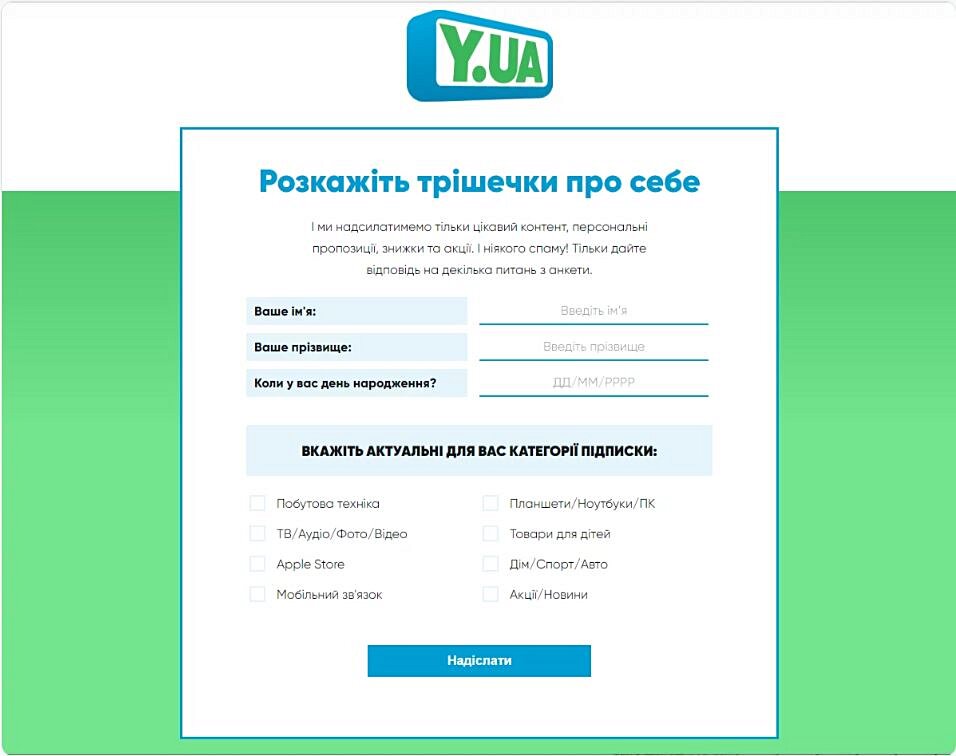
A questionnaire should include only the data needed for a specified lawful purpose.
Clean the Data Before Calculating Metrics
- Remove transactions uploaded more than once. Check the document number together with the store code, and for product lines, also check the line number. The same amounts and dates alone do not prove duplication.
- Find possible customer duplicates. Standardize phone number formats and check for matches. A shared family number may belong to several people, so merge records only after confirmation.
- Separate shared cards. If a card is used by a family, company employees, or several buyers, the result describes the card’s activity. You cannot determine the number of individuals who used it.
- Identify anonymous sales. Do not count a general card used for sales without customer identification as one buyer with a high number of repeat purchases. Do not include unassigned and test cards in the customer count.
- Check card replacement and reissue. A buyer’s transaction history should remain linked after a card is replaced. If its code was issued to someone else, split the history by actual users and periods of use.
- Reconcile returns. Check the amount sign, unit quantity, and link to the sale. A cancelled document must not also remain a completed sale.
For the repeat purchase metric, we recommend counting receipts on which at least some purchased goods remain after linked returns. Exclude a fully returned receipt from this count. Record the date of the check: a later return may change the result for an earlier period.
For revenue for a period, apply a separate rule: subtract returns processed during that period from sales in that period. These may include returns of earlier purchases. If you need to assess the quality of sales from a particular month, select that month’s sales and the returns linked to them over the same observation period.
Calculate Metrics Using the Correct Denominators
The following are working definitions for store management analysis. Apply the same rules to all periods being compared. If the denominator is zero, mark the metric as not calculable.
| Metric | Formula and scope | How to use it |
|---|---|---|
| Share of receipts with an identified customer | Number of completed receipts linked to a personal customer code ÷ total number of completed sales receipts × 100%. Returns are not counted as sales receipts | Check what share of sales is covered by customer analysis. A decline may explain a decrease in the number of known buyers |
| Share of repeat buyers during the period | Number of unique identified customers with two or more purchases ÷ number of unique identified customers with at least one purchase in the same period × 100% | Compare periods after checking duplicates, shared cards, and returns |
| Purchase frequency | Number of purchases by identified customers ÷ number of unique identified customers who made a purchase. The definition of one purchase must be the same in the numerator and denominator | Check whether the number of transactions per active buyer has changed |
| Average transaction value after discounts | Amount of completed sales after discounts, before subtracting returns ÷ number of corresponding sales receipts | Check basket composition, unit quantity, and the effect of discounts. Analyze returns separately |
| Revenue after discounts and returns | Amount of sales after discounts during the period − amount of returns during the period. Apply a consistent tax basis to the amounts | Assess the result of product transactions and reconcile it with the accounting records. Check payments separately |
| Share of returned units from selected sales | Number of units returned from selected sales ÷ number of units in those sales × 100%. Use the same return observation period | Review products, sizes, descriptions, quality, or sales staff consultations |
| Discount share | Discount amount for selected sales ÷ value of those same sales before discounts × 100% | Check the actual discount depth. For the share across all sales, use all sales; for a promotion, use only its transactions |
Illustrative example. During a month, 100 identified customers made purchases at a store, and 30 of them made at least two purchases under the established rules. The share of repeat buyers is 30 ÷ 100 × 100% = 30%. The denominator is identified customers who made a purchase during the month. Visitors and receipts are not included. This result describes repeat purchases within the month and does not by itself prove future loyalty.
Check How Many Customers Purchase Again in the Next Period
To find out how many buyers from the previous month purchased again, record their list and find the overlap with buyers from the following month. Formula: number of customers from the initial list who purchased in the next period ÷ number of customers on the initial list × 100%. New buyers in the following month do not increase the numerator.
If you compare groups by first purchase, check that you have enough history: the first purchase in the available spreadsheet may not have been the customer’s first. Give each group the same amount of time to make a repeat purchase. A lack of purchases during a month should be assessed in light of the product’s usual purchase cycle.
Distinguish Revenue, Gross Profit, and the Effect of Discounts
Revenue after returns shows the amount of product transactions under the selected rules. Money received from buyers may differ because of prepayments, deferred payments, and repayment of previous debts. Prepare separate totals to assess sales and track payments.
Calculate gross profit as revenue after discounts and returns minus the cost of the corresponding goods sold, accounting for returns. Use comparable tax bases for the metrics. If cost data is incomplete or cannot be linked to transactions, record this gap and limit the conclusion to an analysis of revenue. Rent, wages, and other expenses must be accounted for separately to assess the subsequent financial result.
Illustrative discount calculation. The value of selected sales before discounts is UAH 20,000, discounts amount to UAH 2,000, and returns at the actual sale price amount to UAH 1,000. Revenue after discounts and returns is 20,000 − 2,000 − 1,000 = UAH 17,000. The discount share of initial sales is 2,000 ÷ 20,000 × 100% = 10%. Cost of goods is not provided in this example, so gross profit cannot be determined.
If the sales amount already includes the discount, do not subtract it again. To assess a promotion, compare revenue, product units, returns, and gross profit with a comparable period. Account for changes in prices, assortment, and product availability. An increase in sales during a promotion alone does not show what share of the increase was caused by the discount.
How to Check Customer Purchases and Activity in Torgsoft
In «Аналіз → Аналіз покупок клієнтів» (“Analysis → Customer Purchase Analysis”), set «Період аналізу» (“Analysis period”): the report shows customers with purchases at all accounting centers in the chain, and the «Центр обліку» (“Accounting center”) field lets you select one location. For a customer, you can open «Розшифровку покупок у вигляді графіка» (“Purchase breakdown as a chart”) by week or month and view the purchase amount, number of products, number of purchases, and number of receipts.
Important limitation: «Число покупок» means the number of product lines. Three different products on one receipt count as three such purchases, while three units of one product on one line count as one. To analyze repeat transactions, check the number of receipts. After changing the period or accounting center, click «Оновити» (“Refresh”) on the chart, as stated in the description of customer purchase analysis.
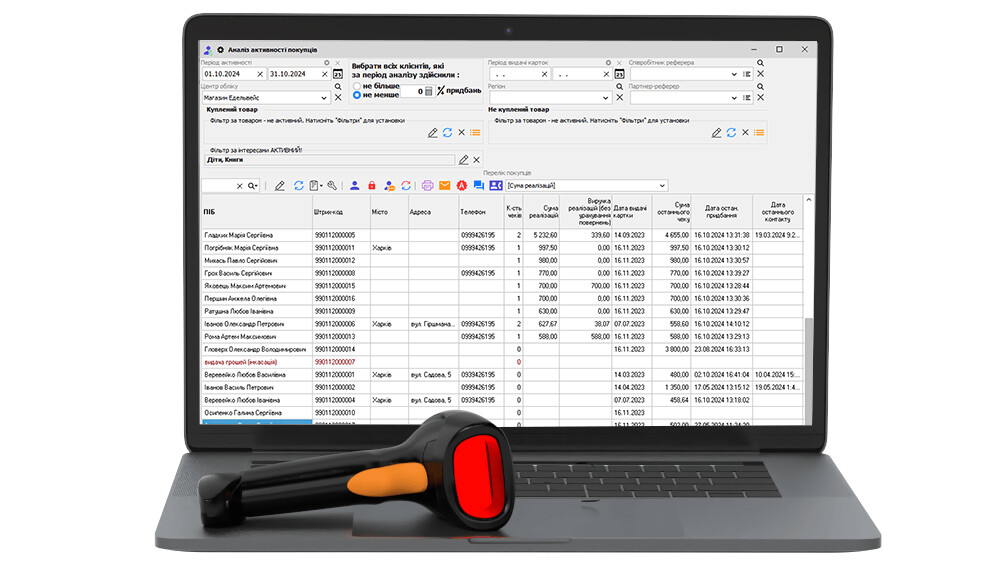
In «Аналіз → Аналіз активності покупців» (“Analysis → Buyer Activity Analysis”), set «Період активності» (“Activity period”) and «Центр обліку» (“Accounting center”). Empty fields mean the entire period for which records have been kept and the entire chain. You can set a purchase count of «не більше» (“no more than”) or «не менш» (“at least”), card issue period, region, referring partner, and referring employee. The «Куплений товар» (“Purchased product”) and «Не куплений товар» (“Not purchased product”) filters include season, supplier, manufacturer, product type, and barcode; the interests filter requires the additional option «Профіль клієнта та дзвінки Binotel» (“Customer profile and Binotel calls”) to be activated.
To check the results, use the columns for number of receipts, sales amounts, last purchase date, and last receipt amount. «Виручка реалізацій» (“Sales revenue”) and its percentage share are shown without accounting for returns, so a separate reconciliation is needed for the total after returns. These conditions are set out in the description of buyer activity analysis.
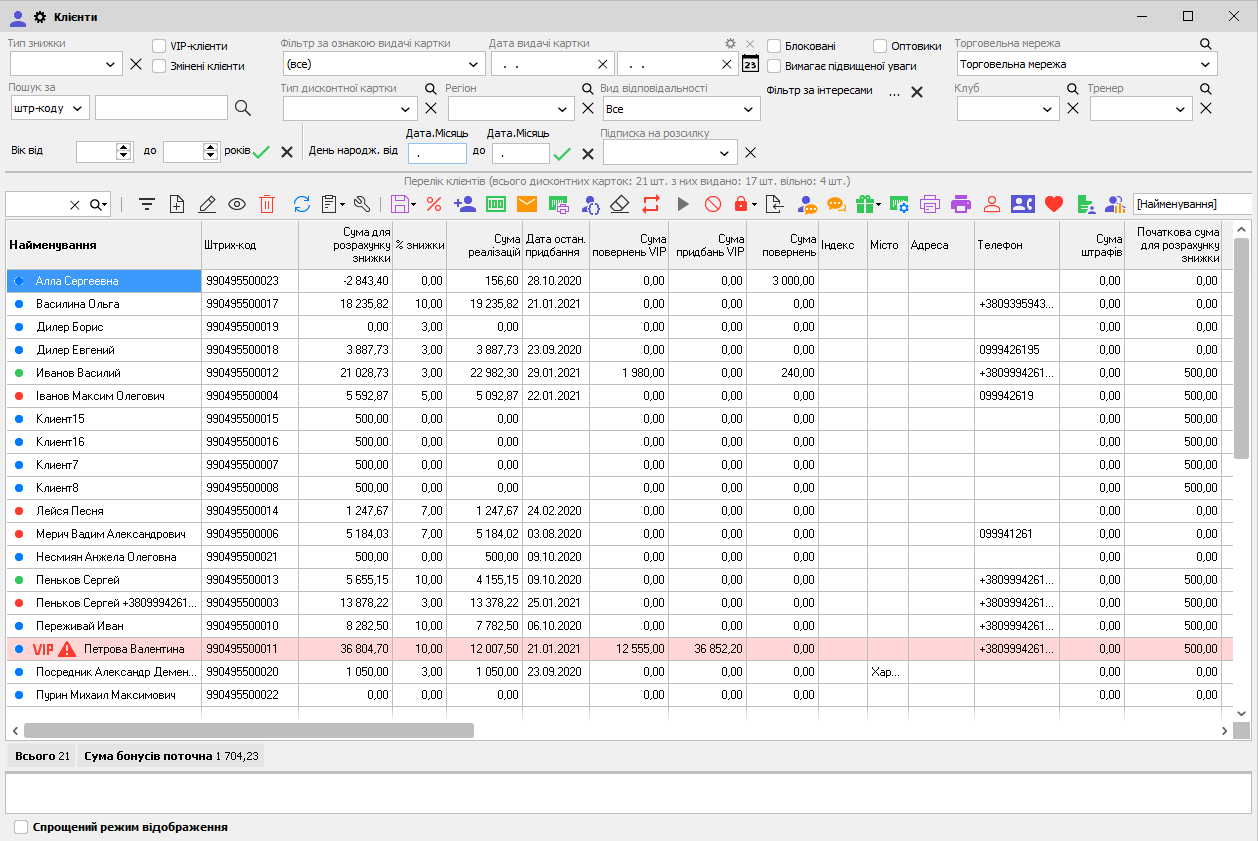
Before calculating, check the records under «Маркетинг → Клієнти» (“Marketing → Customers”). According to the customer database documentation, merging cards and deleting customer information when clearing a card are irreversible. Clearing deletes purchase and return information; if done on the central computer, it applies to all stores in the chain. Merging on the central computer also applies to all stores. A merge performed at a peripheral store is transferred only to the central computer, where it applies to that store, and does not extend to other stores.
The program merges records by barcodes regardless of names, so before taking action, check that the same codes identify the same customers across the chain. «Сума для розрахунку знижки» (“Amount for discount calculation”) includes initial amounts, adjustments, advances, bonuses, and separate components for sales to customers with VIP status (Very Important Person), so use the relevant transactions to calculate revenue for a period. The descriptions of the two analytical reports do not specify all rules for including credit and VIP transactions: before using the totals, reconcile a sample sale, payment, and return with the original documents.
For the customer accounting package, the Torgsoft solution page specifies the «Ультра» (“Ultra”) or «Термінальна версія» (“Terminal version”) license and the «CRM. Взаємодія з клієнтом» (“CRM. Customer Interaction”) option, where CRM stands for customer relationship management. Use the reports described above as a source of verified data; apply your defined rules to the formulas for repeat purchases and group comparisons.
Organize Lawful and Secure Handling of Customer Data
For a store that processes personal data in Ukraine, the requirements of the Law of Ukraine “On Personal Data Protection” dated 01.06.2010 No. 2297-VI apply. Article 6 requires a specific lawful purpose, accurate data, and information that is appropriate and not excessive. Data may be stored in a form that allows a person to be identified only for as long as needed for the lawful purposes of processing.
Article 11 sets out the grounds for processing, including consent, entering into and performing a transaction, fulfilling a legal obligation, and protecting legitimate interests, unless the individual’s fundamental rights and freedoms take precedence. Identify the applicable ground for each task. Data needed to fulfill an order should not automatically be used for any other purpose. Under Article 6, changing to a new purpose that is incompatible with the original one requires consent unless otherwise provided by law.
To apply these requirements to analytics, we recommend that you:
- Describe the purpose and required fields. To assess repeat purchases, retain the customer code, dates, and transactions. Do not add education, marital status, or full address without a need related to the defined purpose.
- Restrict access by role. Give analysts codes and amounts, staff responsible for contacting customers the required contact details, and managers summary data. Use separate accounts and revoke access when duties change or employment ends.
- Control copies. Limit export rights, store working files securely, set review and deletion periods, and check whether data can be restored from a backup.
- Plan for customer requests. Decide who receives requests, locates the data, and handles requests to correct or destroy data or withdraw consent.
- Use external artificial intelligence only for safe summaries. Do not upload named customer lists, phone numbers, addresses, or purchase histories linked to people. To get help with formulas, prepare fictional examples or aggregated tables that do not allow buyers to be identified. Replacing a name with a code does not, by itself, remove the possibility of identification.
Article 24 of this Law requires protection of data against accidental loss or destruction, unlawful processing, and unauthorized access. An individual entrepreneur personally ensures the protection of the data they hold. Article 8 provides customers with the right to know the purpose and conditions of processing, access their data, withdraw consent, and request changes or deletion of data processed unlawfully or that is inaccurate. A response about whether data is being processed and its contents must be provided no later than 30 calendar days from receipt of the request, except in cases specified by law.
Turn the Results into Action and Check the Outcome
After calculating, reconcile the total sales by customer with the overall report for the same period and stores. Show anonymous sales and returns separately. If the totals do not match, check filters, document statuses, units of count, and rules for including transactions.
Then record the conclusion along with a check of a possible cause. For example: “The share of repeat buyers declined; the share of identified receipts is stable; the product was unavailable in a category they had bought from before.” This gives you a reason to check stock levels and orders. The reason must be confirmed using inventory and sales data.
- Choose one action. For example, adjust stock for specific products, revise their descriptions, or change the discount terms.
- Assign a responsible person and deadline. The staff member needs to know exactly what to change and when the manager will check completion.
- Define the outcome metric in advance. For inventory, this could be days in stock and sales; for a product description, the share of linked returns; for a discount, gross profit based on reliable cost data.
- Allow time for observation. Check repeat purchases in light of the usual product purchase cycle and under consistent comparison conditions.
- Record the decision after checking. Continue, adjust, or stop the action, specifying the metrics and circumstances on which the decision is based.
Keep the formulas, period, stores, return rules, and known limitations in the working report. This will allow you to reproduce the calculation next time and check whether buyer behavior changed after the management action.


 Go back to the previous step