


Launch an online store when you can present an accurate catalog, fulfill orders, and calculate their financial results. To start, choose products that are in demand and available in stock, test a purchase on a phone, and assign responsibility for each stage of the sale.
In addition to advertising costs, include product cost, payment processing fees, packaging, expected return costs, fixed expenses, and taxes. This will help you set a budget for testing demand and determine the conditions under which sales may be profitable.
10 steps to launch an online store
- Define your customer and core offer. Write down who needs the product, what they need it for, what influences their choice, and how much they are willing to spend. Use customer questions, sales history, and brief conversations with potential buyers. Build your offer around specific products, their features, and the terms of purchase and delivery.
- Choose your initial product range. Consider demand, actual stock levels, replenishment times, and storage costs. Decide how many items to list based on your ability to keep product data accurate and fulfill orders. Check each size, color, or configuration separately if it has its own stock level.
- Prepare product pages. Add the product name, SKU, intended use, material, what is included, dimensions with units of measurement, and photos from the necessary angles. Show the price and current availability. For products available to order, state the expected delivery time. Make sure the description and photos match the specific product variant.
- Describe the purchase terms. Specify payment methods, the delivery cost or how it is calculated, dispatch times, return terms, and a contact for inquiries. Buyers should be able to see this information before confirming an order. Make sure the wording matches how the store actually operates and that staff can meet the promised timelines.
- Check the catalog and search. Try finding a product by name, SKU, and feature. Review categories and filters on a phone. Check whether shoppers can distinguish similar models, choose the right variant, and understand its availability without contacting a manager.
- Complete a test checkout. On a phone, add a product to the cart, change the quantity, and select delivery and payment. Check the total and confirmation. Also test an incorrect phone number, a blank field, a failed payment, and a lost connection: the message should explain what the buyer needs to do next.
- Agree on stock reservation rules. Decide when an item is reserved, who confirms availability, and when a reservation is released after cancellation or nonpayment. Test what happens when the last unit is ordered online and bought in the physical store at the same time. Write down the manual steps for this situation.
- Organize order handoff. Assign responsibility for checking payment, picking, packing, and dispatching orders. Set a way to record completed actions. Prepare procedures for out-of-stock items, address changes, cancellations, and returns. Agree on who tells the buyer about a delay.
- Prepare customer acquisition and support. Choose a channel where you can test demand with a set budget: search ads, content, or customer referrals. Assign someone to track spend and results. For support, set business hours, a response time, and an employee to handle complex inquiries.
- Run a test sale. Check the entire journey through to delivery: order details, payment, reservation, picking, and customer notifications. Record errors and fix them before increasing the ad budget. Check the first real orders against the same list.
How to calculate order and advertising results
Revenue is the total amount of sales. Contribution margin is the revenue left after variable costs; it can go toward covering fixed expenses and generating profit. For analysis, calculate it separately before and after advertising. Calculate net profit after accounting for all expenses and taxes for the period you selected.
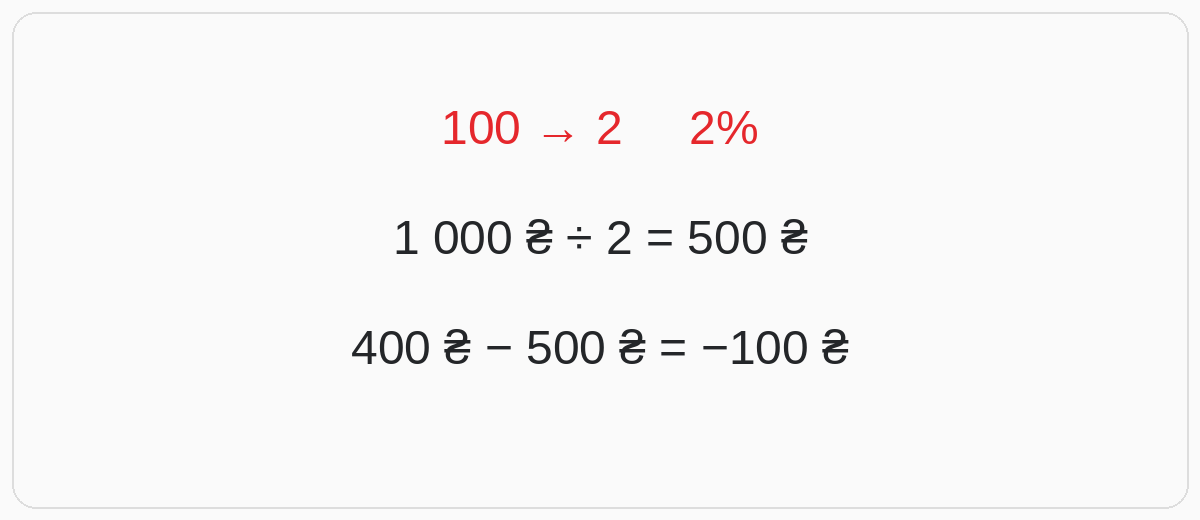
Illustrative example. An ad campaign brought in 100 visits and generated two completed orders from two new customers. Conversion to a completed order: 2 ÷ 100 × 100% = 2%. With ad spend of UAH 1,000, the customer acquisition cost, or CAC, is 1,000 ÷ 2 = UAH 500 per new customer. This calculation requires new customers acquired through this campaign.
Revenue per order is UAH 1,200. Product cost is UAH 700, payment processing costs UAH 24, packaging costs UAH 26, and the planned reserve for return-related costs is UAH 50. Contribution margin before advertising: 1,200 − 700 − 24 − 26 − 50 = UAH 400. The reserve here is an estimate for planning; compare it with actual costs over time.
Two orders bring in UAH 2,400 in revenue and UAH 800 in contribution margin before advertising. After ad spend, the result is 800 − 1,000 = −UAH 200. This is a loss before fixed expenses and taxes. Add hosting, rent, labor, and other expenses for the period separately. Under these conditions, CAC must be below UAH 400 to leave a contribution toward covering them.
Synchronizing an online store with Torgsoft
The additional paid option “Online Store Synchronization” exchanges product data through CSV/YML files, transfers photos, and imports new orders in the documented SAL/XML/JSON formats. The fields and requirements are described in the synchronization format reference. The availability of individual formats depends on the database version.
The website needs a compatible integration or adapter—a module that processes files and matches products and orders. The integrator configures the exchange in Torgsoft, while the developer is responsible for the website side. The setup process is described in the official integration guide. Agree on the exchange interval and protection against duplicate imports; check how the system handles an unavailable product, a cancellation, and recovery after a restart. Advertising results depend on the offer, audience, and acquisition costs.
What to check each week
- Demand: visits by channel, completed orders, conversion, new customers, and CAC.
- Unit economics: revenue, variable costs, contribution margin before and after advertising, fixed expenses, and taxes.
- Fulfillment: cancellations, returns, delays, stock discrepancies, and support response time.
Compare metrics using consistent definitions and time periods. There is no universal “normal” conversion rate: assess your own channels, products, and completed sales. If you have visits but few orders, check whether the ad matches the product page, and review product availability, delivery, and checkout. If orders are unprofitable, review prices, variable costs, and CAC. For the next week, choose a specific change and a metric to assess its result.


 Go back to the previous step