


Start your store’s internet marketing with one product group, one promotion channel, and a budget set in advance. Before launch, prepare product pages, check the order process, and set up tracking that lets you compare inquiries with payments, cancellations, and returns. Decide on further spending based on the money left after product costs, order fulfillment, and marketing expenses.
The owner sets the test’s financial limits, the store employee keeps prices and stock levels up to date, and the marketing contractor is responsible for launch and reporting. Agree at the outset on what counts as a successful purchase, how returns will be accounted for, and when spending will stop. The website of a Ukrainian seller must provide the seller’s details, offer terms, and information about the processing of personal data.

- How to Choose the First Store Promotion Channel
- How to Start Free Product Listings on Google
- How to Match Marketing Events with Actual Payments
- How to Calculate an Acceptable Cost to Acquire a Purchase
- What to Agree with a Marketer or Agency
- What Website, Advertising, and Customer Data Requirements to Consider
- How to Use Artificial Intelligence in Store Marketing
- How to Use Torgsoft to Analyze Customer Purchases for Marketing Offers
- A 30-Day Store Marketing Test Plan
- Official Sources for Store Operations
How to Choose the First Store Promotion Channel
First define a specific objective: sell a certain product group, get repeat purchases, or help shoppers understand a complex assortment. For the first test, choose products with current prices, sufficient stock, and clear sales costs. If an employee cannot confirm orders on time, organize that work first.
The table can help you choose an initial test. The suggested criteria are a practical way to organize store operations, not a promise of results from any particular channel.
| Channel | When to choose it | What to do first | What to assess |
|---|---|---|---|
| Search engine optimization of the website — SEO | Shoppers search for specific products or answers to questions about choosing them | Organize one category: names, specifications, photos, prices, stock levels, and links to products | Visits to these pages, inquiries, and completed purchases. Over 30 days, also assess the work completed and initial changes; do not expect guaranteed rankings |
| Free product listings in Google Merchant Center | You have an online store and can maintain accurate catalog data | Add a small group of products, fix errors, and compare the data with the website | Product eligibility, actual impressions and clicks, and purchases after clicks |
| Useful articles, photos, and videos | People need a demonstration, comparison, or explanation before buying | Prepare material that answers one real customer question and links to the relevant product | Visits to products, meaningful inquiries, purchases, and employee time spent |
| Email newsletter | You have customers for whom the offer is relevant and a valid basis for using their contact details | For the pilot, select subscribers with recorded consent and prepare one offer with an unsubscribe option | Clicks, paid purchases, unsubscribes, and complaints |
| Paid advertising campaign | The store is ready to accept orders, and the owner can set an acceptable cost to acquire a purchase | Choose one product group, a landing page, a budget limit, and stop rules | Cost per completed purchase and the contribution those purchases make toward the store’s costs |
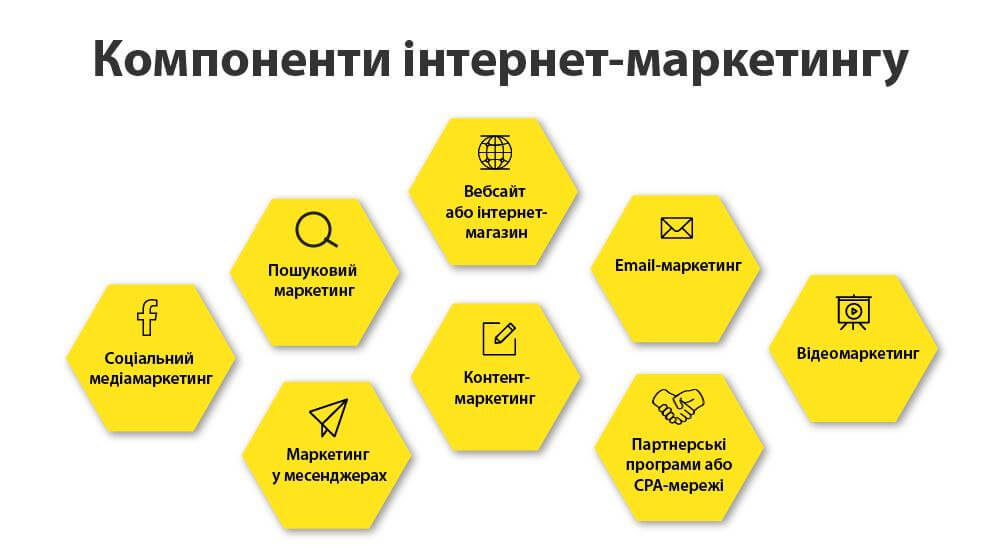
Choose one pilot—a limited trial launch. For example, promote one category with paid advertising for a month while maintaining the other channels as usual. Record price changes, discounts, and stock disruptions: they may explain changes in sales. Launching several new channels at once will make it harder to understand which one produced a result.
How to Start Free Product Listings on Google
In Google Merchant Center, a service for submitting assortment information, products that meet the requirements may be shown for free. An enabled feature status does not guarantee impressions: Google matches product data with shoppers’ queries. The availability of specific formats also depends on the country and service. This is explained in the free product listings policies.
- Assign someone to manage the catalog. They must keep prices and stock levels consistent on the website and in Merchant Center.
- For the test group, prepare product identifiers, names, descriptions, page links and images, prices, and stock levels. Other required attributes depend on the product: clothing, for example, requires size and color details. Use genuine manufacturer identifiers.
- Publish the return policy on the website and explain delivery and its cost clearly. Align the relevant account settings with the store’s terms.
- In “Маркетинг” → “Маркетингові методи” (“Marketing” → “Marketing methods”), review the status of free listings. Administrator access is required to change it.
- On the “Товари” (“Products”) page, open “Потрібна дія” (“Needs attention”) and fix the errors. Then assess free listings separately in the “Ефективність” (“Performance”) section.
Allow time to prepare and update the catalog for this test. Even when impressions are free, employee or contractor time has a cost. If a partner platform submits the data, agree with the partner on how to correct it and who is responsible for updates.
How to Match Marketing Events with Actual Payments
A conversion is an action the store has defined as a goal: an inquiry, an order, or a purchase. The metric’s name in a report does not confirm that money was received. A customer may submit a form twice, choose cash on delivery and fail to collect the parcel, or return an item they have already paid for.
In Google Analytics 4, a web analytics service abbreviated as GA4, you can set up events for viewing a product, adding it to a cart, starting checkout, making a purchase, and issuing a refund. This requires an installed Google tag, access to analytics, and the ability to configure the website. A developer must implement data transmission according to the GA4 ecommerce documentation.
What to Assign to the Developer
- Describe the trigger condition for each event. For example, clicking the checkout button and confirming a purchase must correspond to different actions.
- Send product identifiers, quantities, amounts, and currency. For a purchase, use transaction_id—a unique transaction identifier that can be matched to an order.
- Set up refund events with the corresponding transaction identifier; for a partial refund, send the relevant products and quantities.
- Use debug mode to check a normal checkout, reopening the confirmation page, a failed payment, and a refund.
- Align the use of analytics and advertising tools with the chosen legal bases for processing personal data and consent settings.
The owner or manager accepts the work using a test order. They compare the order number, contents, and amount on the website with the analytics events, and separately confirm payment. If purchase is sent when a cash-on-delivery order is placed, reporting must clearly distinguish that event from money received.
What Register to Keep at the Store
A restricted-access spreadsheet is sufficient for a small pilot. The manager records the order number, date, traffic source, products, amount, payment status, shipment, cancellation, and return. The owner adds expenses and summarizes the result. Include a customer’s personal data only when it is needed for a specific task.
To distinguish visits, use UTM tags—parameters in a link that identify the source, promotion method, and campaign. Agree on consistent names in advance, and do not add phone numbers, email addresses, or other customer data to links.
- Duplicates. The manager matches repeat requests and counts one actual purchase in the total. Multiple events for the same order must not increase the number of sales.
- Cancellations and unpaid orders. Keep them in the register for analyzing the reasons, but exclude them from paid sales.
- Returns. A full return reduces the result of the corresponding purchase; a partial return reduces its amount and contribution. Separately account for costs the store has already incurred and not recovered.
- Unknown source. Keep a separate category for purchases whose origin cannot be reliably determined. Do not assign them to channels arbitrarily.
For weekly reporting, use consistent rules for the time zone, order period, date on which a payment is counted, and point at which returns are recounted. A report covering the most recent days may be provisional if some parcels are still in transit. A visitor’s consent to certain types of data processing may also limit available measurement; do not expect analytics to match every sale exactly.
How to Calculate an Acceptable Cost to Acquire a Purchase
To manage the test, use the order contribution: the sales amount after discounts and returns, minus the cost of goods and variable expenses incurred to fulfill that order. These may include packaging, payment fees, delivery paid by the store, and other expenses under your operating model. Account for taxes according to the actual tax system. This is an internal management calculation and does not replace bookkeeping.
Illustrative numerical example. After all these deductions, but before marketing expenses, one completed purchase leaves UAH 300. The owner decides to retain at least UAH 100 to cover fixed costs and profit. Therefore, for this test, the acceptable marketing expense is UAH 300 − UAH 100 = UAH 200 per purchase.
Suppose the store spent UAH 2,400 on ad placement and UAH 600 on preparation and contractor work. Total expenses are UAH 3,000. After removing duplicates, cancellations, and full returns, 20 paid and fulfilled purchases remain. The cost to acquire one purchase is UAH 3,000 ÷ 20 = UAH 150. Their combined contribution before marketing is 20 × UAH 300 = UAH 6,000; UAH 3,000 remains after marketing.
If, under the same conditions, there are 12 completed purchases, acquisition costs UAH 3,000 ÷ 12 = UAH 250 per purchase, and 12 × UAH 300 − UAH 3,000 = UAH 600 remains after marketing. The acquisition cost exceeds the owner’s set limit of UAH 200 per purchase. With the same contribution, at least UAH 3,000 ÷ UAH 200 = 15 completed purchases are needed to stay within that limit. In an actual calculation, use each order’s actual contribution and separately deduct unrecovered costs from unsuccessful orders.
These amounts are an example, not rates or a sales forecast. Even purchases attributed to an advertising source do not prove that all of them were additional purchases generated by the advertising. Before increasing the budget, also compare total category sales and the store’s contribution with a previous comparable period, taking price and stock changes into account.
What to Agree with a Marketer or Agency
Before work begins, put the scope of services, placement budget, contractor fee, access rights, and method for accepting the work in writing. The contractor’s fee and advertising funds must appear separately in the report.
- Definition of results. Clarify whether you are paying for setup, impressions, inquiries, or other agreed actions. If the fee depends on sales, define how payments, duplicates, and returns will be verified.
- Rule for attributing a purchase to a channel. Agree on which click and what period after it qualify a purchase for the report. The same sales may appear in reports from different systems; do not add them together without matching them.
- Limits on available information. The contractor must explain which payment and return data they do not receive and what measurement limitations affect the report.
- Access and handover. The owner must have agreed access to accounts, materials, and reports, and understand how the relationship can be ended.
- Personal data. Define who receives it, for what purpose, and in what amount. Use aggregated metrics for reporting campaign economics when identifying customers is unnecessary.
Return on ad spend, or ROAS, compares revenue attributed to advertising with the cost of placing the ads. It does not show profit: the cost of goods and contractor fee are not included in ad placement costs, and whether returns are accounted for depends on which revenue figure is used. Ask for actual completed purchases, total marketing costs, and the contribution after those costs to be shown together.
What Website, Advertising, and Customer Data Requirements to Consider
For a store selling in Ukraine, the basic marketing requirements concern identifying the seller, making accurate offers, and using data lawfully. Meet these requirements before attracting shoppers to the website.
Make the Seller’s Details Available
Under Article 7 of the Law of Ukraine “On Electronic Commerce”, the seller must provide direct, easy, and stable access to its full legal name or the surname, given name, and patronymic of an individual entrepreneur; the legal entity’s location or the entrepreneur’s place of registration and actual residence; email and/or the online store’s address; and the legal entity’s identification code or the entrepreneur’s taxpayer registration number. For an entrepreneur who has officially declined such a number on religious grounds and has a corresponding passport notation, the law provides for passport details.
If the activity is subject to licensing, publish the information about the license required by law. Explain whether taxes are included in the price and state the delivery cost. In practice, you can provide sections with seller details and purchase terms that are accessible from every page. The manager must check that customers can also view this information on a smartphone.
Write Accurate Ads and Identify Advertising
Articles 7–10 of the Law of Ukraine “On Advertising” require advertising to be truthful and prohibit concealed and unfair advertising. Material about a product that is distributed for money or other compensation must be identified with the word “реклама” (“advertisement”). Agree on this with the blogger or platform before placement, including when the compensation is a product.
Ads for discounts or sales must state the location, start and end dates, and the relationship between the new and previous prices or the size of the discount. Prices for goods sold in Ukraine must be stated in hryvnias in advertising. A contest or prize draw must include its time limits, location, and a source for the full terms; changes to the terms, location, or dates must be announced in the same manner as the original announcement.
Obtain written or electronic consent before using a customer’s name or photo in advertising. Article 8 allows an image to be used without separate consent in cases including where a person posed or performed a role to create advertising for monetary or other compensation, and the advertiser has sufficient intellectual property rights in the advertising for its chosen method of distribution. This exception applies to the image; a customer’s ordinary review by itself does not grant permission to use their name or photo in advertising.
For products that require a certificate, permit, or license, check the relevant documents before advertising. If the activity, production, or circulation of a product requires a permit or license, an advertiser that is a resident of Ukraine must also check whether information about its issuance is available in the relevant registers of permitting or licensing authorities. If this information is unavailable, ordering distribution of the advertising is prohibited.
Separate Order Fulfillment from Marketing Emails
Under Articles 6 and 11 of the Law of Ukraine “On Personal Data Protection”, each processing purpose requires a legal basis. Fulfilling an order may rely on entering into and performing a contract. Using the same contact details for advertising requires a separate assessment of the legal basis; if the purpose changes to one incompatible with the original purpose, consent is required unless otherwise provided by law.
If you obtain personal data directly from a customer, tell them at the time of collection who controls the data—the person who determines the purpose of processing—which information you collect, why, to whom you transfer it, and what rights the person has. If you obtain data from other sources, notify the person within thirty working days from the date of collection, except in cases established by law.
These time limits are set out in Article 12. Collect only the data you need and establish a justified retention period. For a newsletter launch, a separate voluntary subscription and retaining the date and content of consent are practical options. Article 8 sets out a person’s right to withdraw consent and other rights; transfers to other parties must also account for Article 14.
Article 10 of the Law of Ukraine “On Electronic Commerce” sets consent as the rule for commercial electronic messages and also allows messages to be sent without it if recipients can opt out of further messages. This exception does not remove the requirements for lawful processing of contact details. For the first test, use voluntary subscriptions. The message must be clearly identifiable as commercial: name the sender, provide access to the seller’s details, and state the promotion terms without ambiguity. If you state a product price, say whether taxes are included; if delivery is available, also state its cost. Before launch, the employee must check that the unsubscribe function works and that the recipient is excluded from subsequent mailings.
How to Use Artificial Intelligence in Store Marketing
Artificial intelligence, abbreviated AI, can help prepare drafts: a video plan, headline options, the structure of an answer to a question, or a product description. Give it specific attributes, permitted claims, the audience, and the customer action you want. Do not ask it to invent properties, certification, reviews, or warranty terms.
For example, a task could read: “Prepare three options for a short product description based on this list of specifications. Do not add new properties. Explain who the product is suitable for and suggest moving on to select a size.” A store employee checks every claim against the product listing, stock, and sales terms, and the person responsible for publication checks the text and links before posting.
Assess a new tool through one small, separate task. Record preparation time, editing time, and the number of factual errors. If editing takes longer than ordinary preparation, change the task or end the test. Use anonymized examples instead of customer correspondence and contact details.
How to Use Torgsoft to Analyze Customer Purchases for Marketing Offers
In Torgsoft, open “Маркетинг” → “Клієнти” (“Marketing” → “Customers”), select a customer, and open their card. The “Придбання” (“Purchases”) tab displays purchases and returns accumulated through transactions associated with that customer. A manager can use this history to prepare a relevant offer, such as suggesting a compatible accessory for a purchased item after taking returns into account. For this, transactions must be linked to the relevant customer.
Before publication, the manager matches the selected products with current stock at the store or warehouse. In Torgsoft, an accounting center is a store or warehouse for which product records are kept; in the pilot worksheet, specify where you plan to fulfill orders from. The “Інше” (“Other”) tab in the customer card has an indicator for consent to receive information by email. Set it according to the actual consent and retain proof of that consent. Compare offer results using order numbers, payments, and returns in the pilot register.
A 30-Day Store Marketing Test Plan
A small team can carry out the plan below. If the owner performs all roles, they should set aside separate time for the catalog, customer responses, and financial calculations. The numerical limits below relate to the illustrative example with a budget of UAH 3,000 and acceptable expenses of UAH 200 per completed purchase.
| Period | Actions and owner | Sign of success | Stop or correction condition |
|---|---|---|---|
| Days 1–3 | The owner chooses a product group, one channel, the budget, and acceptable cost per purchase. The manager checks stock | There is a written goal, contribution calculation, and product list | Do not start spending if the cost of goods is unknown or the order cannot be fulfilled |
| Days 4–7 | The manager prepares pages and offer terms. The developer configures events. The owner accepts a test order | It is possible to match an order, event, and payment; unsubscribe works if testing a newsletter | Delay the launch if purchases are duplicated, prices are wrong, checkout is broken, or data requirements are unmet |
| Days 8–14 | The contractor launches the channel within the budget. The manager updates order statuses and stock daily | Sources are tagged, and actual expenses and purchases are entered in the register | Pause placement if a product is unavailable or the ability to match data is lost |
| Days 15–21 | The owner and contractor analyze completed purchases. If needed, they change one element: the ad, page, or offer | There is an explanation of the problem and a recorded change whose result can be assessed | Illustrative interim threshold: after UAH 1,500 in total expenses, fewer than eight completed purchases. Pause new spending and find the reason; assess deliveries that are still in progress separately |
| Days 22–30 | The manager reconciles payments and returns. The owner calculates full expenses and contribution, then makes a decision | With the illustrative UAH 3,000 budget, there are at least 15 completed purchases, each with a contribution of UAH 300 | Do not increase the budget if acquisition costs exceed the agreed limit or the total still depends on a significant number of unfulfilled orders |
At the end of the test, record a brief decision: continue at the same level, change a specific condition, or stop spending. Add a date for recalculating results after deliveries are complete and returns are accounted for. Launch a new channel when the store can already explain the expenses and results of the previous one.
Official Sources for Store Operations
- Law of Ukraine “On Advertising,” dated 03.07.1996, No. 270/96-VR: Articles 7–10—truthfulness, general requirements, discounts, identification, and prohibition of unfair advertising.
- Law of Ukraine “On Electronic Commerce,” dated 03.09.2015, No. 675-VIII: Articles 7 and 10—seller information and commercial electronic messages.
- Law of Ukraine “On Personal Data Protection,” dated 01.06.2010, No. 2297-VI: Articles 6, 8, 11, 12, and 14—processing purposes and legal bases, individual rights, notices, and data transfers.
- Google Merchant Center Help: Free Product Listings.
- Google Analytics documentation: Measuring Ecommerce.
- Torgsoft Help: Customer Card.


 Go back to the previous step