


To choose products to sell on Prom, test several focused assortment ideas in small batches. Before purchasing, calculate the costs for one completed order, prepare accurate product listings, and decide how much you are willing to spend on the trial. Expand the assortment after customers have received their products and you have accounted for promotion, order processing, and returns.
Below are ten categories you can use to build your own test. These are practical hypotheses: results depend on the specific product, supplier, price, description, delivery, and store operations. Check each hypothesis against Prom analytics and your own records to see which sales leave enough contribution to cover fixed costs and generate profit.
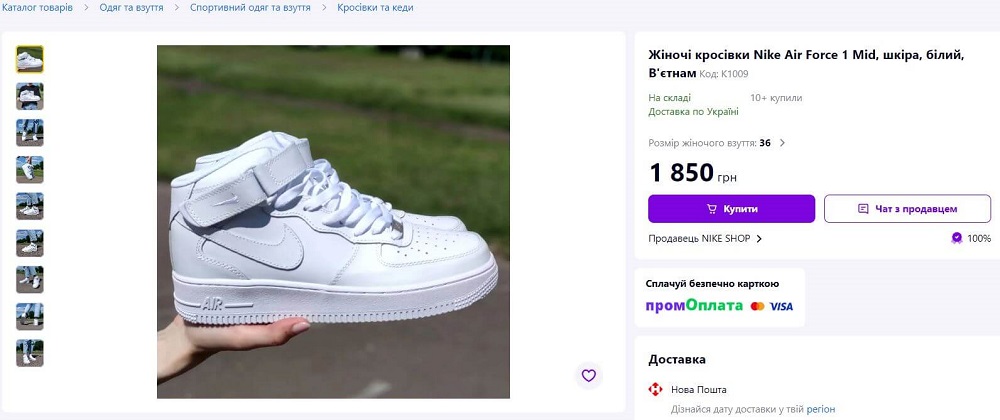
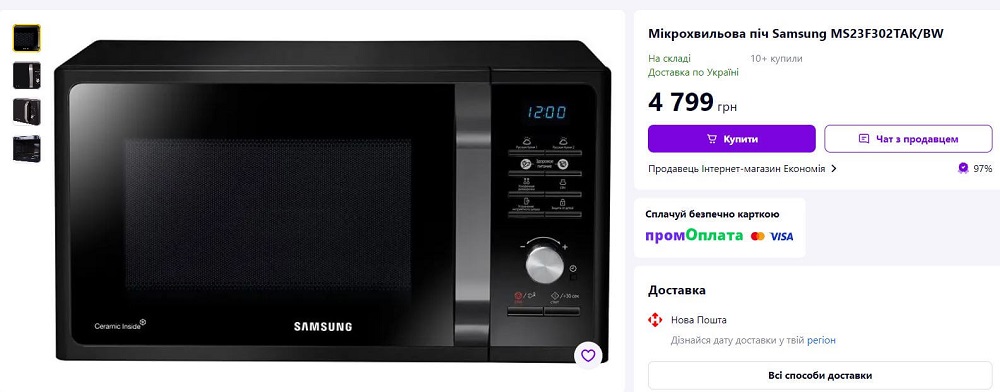
The images illustrate product listing layouts. Check current prices, availability and seller terms directly on the marketplace before purchasing stock.
How to use Prom data to choose your assortment
The official Prom page lists appliances and electronics, home and garden goods, auto and motorcycle products, clothing and footwear, and beauty and health among its leading categories by number of orders. The platform names food and beverages, pet supplies, tools, repair materials, and construction products among growing categories. This information can help you choose a broad area to investigate, but it does not establish demand for a particular model or show whether it will be profitable for your store.
A practical approach is to start with a category where you can check product quality, explain its features to customers, and obtain a small repeat shipment. Frame your hypothesis around a specific need. For example, instead of the general idea of “selling home goods,” test drawer organizers of a particular size. That lets you compare similar offers and understand why a customer chose or rejected a product.
10 product categories to test on Prom
Every option in the table is a proposed hypothesis for a trial sale. Choose the ones for which you have a suitable supplier, enough budget, and the ability to process orders well.
| Category | What you could test | How to prepare the offer | What to learn during the test |
|---|---|---|---|
| 1. Smartphone accessories | Cases or glass screen protectors for a limited list of models. | Specify exact compatibility, material, color, and what is included. Create a clear inventory identifier for each model. | Whether specific options sell, and whether customers return products because they selected the wrong model. |
| 2. Home organizers | Drawer dividers, baskets, or containers for a specific use. | Show the external and usable interior dimensions, the number of items in the set, and how to install them. | Whether the dimensions meet the customer's needs and how packaging affects delivery costs. |
| 3. Cleaning accessories | Brushes, cloths, or replacement heads with a clearly defined use. | Describe the material, size, care instructions, and compatibility of replacement heads. Check the specifications on a sample. | Whether a small order leaves enough contribution after processing costs and whether customers understand the product's purpose. |
| 4. Car accessories | Cabin organizers or holders with a specific mounting method. | Show where it is installed, its dimensions, and any compatibility limits. Do not use “universal” unless you can substantiate what that means. | Whether customers refuse orders because the mount or dimensions do not fit, or because the product is inconvenient to use. |
| 5. Footwear | One sneaker model in a limited range of sizes. | Include actual measurements, material details, and your own photos. Track each size and color combination separately. | Which sizes sell and how much exchanges cost due to fit or inaccurate measurements. |
| 6. Children's arts and crafts supplies | Sketchbooks, paper, or material sets with clearly specified contents. | List every component, show its dimensions, and include the intended use and warnings from the manufacturer's documentation. | Whether the set meets customer expectations and whether there are complaints about missing components or damage. |
| 7. Pet accessories | Leashes, bowls, or beds in several specified sizes. | Show measurements, materials, care instructions, and use limitations confirmed by the manufacturer. | Whether customers choose the right size and whether the product's dimensions affect their willingness to pay for delivery. |
| 8. Hand tools | Screwdrivers, wrenches, or small sets for specific jobs. | Give the exact tool list, dimensions, and specifications from the supplier's documentation. | Whether the contents match the description, what quality concerns come up, and how much time consultations take. |
| 9. Garden accessories | Gloves, plant ties, or hand tools for plant care. | Specify the size, material, quantity per package, and intended use. Set a date in advance to review stock. | How orders change over the season and whether you can sell the batch before demand falls. |
| 10. Small household appliances | A limited selection of models that the supplier can regularly ship and support after the sale. | Check the contents, specifications, product documentation, and process for reporting defects. | Whether the contribution covers delivery, inspection, consultations, and handling damage or defects. |
For a first test, you could choose one or two categories if your budget lets you compare them without making a large purchase. This is a practical recommendation to adapt to product costs and the supplier's minimum order quantity. If a store launches many different categories at once, it becomes harder for the owner to trace costs and prepare quality descriptions for each item.
How to run a small-batch trial sale
- Identify the customer's need. Write down who the product is for, what it does, and which features customers should check before ordering. This will form the basis for the title, photos, and description.
- Check the supplier using a sample. Inspect the product, verify its contents and measurements, and assess its packaging. Agree on repeat-shipment times and what to do if an item is defective or shipped incorrectly.
- Limit your investment. Set a maximum purchase amount and a separate promotion budget. Keep some funds available for packaging, returns, and repurchasing a product that performs acceptably.
- Prepare the listings. Use accurate titles, actual specifications, clear contents, and photos. State actual availability and a dispatch time your store can meet.
- Record the test conditions. Note the dates, prices, batch contents, promotion payment model, and budget. If you change a photo, description, or price, record the date so you can compare the change with the results.
- Reconcile the orders. Check which customers received the product, which orders were canceled, and what costs arose after dispatch. Then decide what to reorder.
Illustrative example for low-cost products: a store tests four items, with three units of each, at a purchase cost of UAH 250 per unit. The purchase costs 4 × 3 × 250 = UAH 3,000. If the seller also allocates UAH 1,200 for promotion and UAH 800 for packaging and possible additional costs, the initial budget is UAH 5,000. These quantities and amounts are examples only; expensive equipment or bulky products require a different calculation.
If the supplier will ship products directly to customers, agree in advance on stock confirmation, dispatch time, packaging, and return handling. You can place a test order and check how the shipment is actually handled. You need this information to give customers accurate terms and calculate your costs.
How to read Prom analytics: impressions, clicks, and orders
According to Prom's official ProSale analytics help article, the “Аналітика” (“Analytics”) section shows data about products promoted on the platform. Sellers can view impressions, clicks, orders, order turnover, and budget spend; select a period, campaign, category, product, traffic source, and payment model; and filter which data appears in the table.
To check a product hypothesis, select the test period, relevant campaign, and category, then open individual products. Review the statistics for the per-order and per-click payment models separately: they calculate costs differently. Also check the traffic source to understand where clicks and orders came from. If needed, use the “Детально за товарами” (“Detailed by products”) export and add your own information about product receipt and costs.
| Metric | How to use it in the test |
|---|---|
| Impressions | Check whether the offer is getting visibility. If impressions are low, first check the category, availability, listing completeness, and campaign settings. |
| Clicks | Calculate clicks as a share of impressions. If impressions are sufficient but clicks are low, check the main photo, title, price, and whether the offer meets the customer's need. |
| Orders | Prom counts orders placed through the cart, including through the marketplace's mobile version and the “Prom Покупки” (“Prom Purchases”) app, as well as orders created through chat. Compare the order count with clicks, but note that this ratio does not show exactly what share of clicks resulted in orders because the metric also includes orders from chat. Reconcile orders against your own records of products received, cancellations, and returns. |
| Order turnover | Use this to assess order volume. To calculate the financial result, separately check revenue actually received and all related costs. |
| Budget spend | Include actual promotion costs and allocate them across completed sales for the selected period, including the cost of clicks that did not lead to a sale. |
Illustrative example: a product received 5,000 impressions, 250 clicks, and 20 orders. Clicks account for 250 ÷ 5,000 × 100% = 5%. The ratio of orders to clicks is 20 ÷ 250 × 100% = 8%. Because Prom also counts orders from chat, 8% does not mean that this share of clicks resulted in orders. If customers received and kept the product in 16 orders, and actual promotion costs were UAH 1,600, the average promotion cost per completed sale is UAH 100. This is an illustrative calculation; acceptable metric levels depend on the costs and contribution of the specific product.
Prom includes all uncanceled orders in analytics. If the seller cancels an order within 10 days of its placement, it will no longer be counted in the statistics. If it is canceled later, it remains in the statistics. For the per-order payment model, the help article also states that the commission charged for such an order will not be refunded. With the per-click model, sellers pay for clicks on products, so those costs must be considered separately from order status. For this reason, sellers need to reconcile statistics with actual fulfillment and record cancellations promptly.
How to calculate a product's contribution after costs
Before purchasing, calculate the costs for a single order. Start with the price after discount and subtract the purchase cost, promotion, packaging, payment and delivery costs paid by the seller, and other variable costs. Account for tax costs according to your actual bookkeeping method. For an initial estimate, you can include expected return costs, then replace them with actual costs after the test.
Contribution after variable costs = sales revenue − purchase cost − all variable costs for that sale. This amount goes toward covering the store's fixed costs and generating profit. If you also allocate listing package or other service costs to the product, state how you allocate them and do not count the same amounts twice.
Here is an illustrative calculation. All amounts are fictional and explain the method; they are not Prom rates or tax rates.
| Item | Illustrative amount, UAH |
|---|---|
| Sale price after discount | 1,000 |
| Purchase cost | 600 |
| Promotion allocated per completed sale | 100 |
| Packaging | 20 |
| Tax costs allocated to the sale for illustration | 30 |
| Expected return costs and additional logistics | 40 |
| Contribution after the listed variable costs | 210 |
| Illustrative allocation of listing package and other placement service costs | 50 |
| Balance for other fixed costs and profit | 160 |
Example arithmetic: 1,000 − 600 − 100 − 20 − 30 − 40 = UAH 210; after the additional UAH 50, UAH 160 remains. If the seller reduces the price to UAH 900 and all other amounts stay the same, the balance falls to UAH 60. Check this calculation before discounting, since more orders can still leave costs insufficiently covered.
Use actual charges and statistics from your account for promotion costs. With the per-click payment model, also include paid clicks that did not result in orders. If you use several reports, check that the same commission has not been counted both in budget spend and as a separate cost item.
How to test seasonal products throughout the year
For a seasonal hypothesis, identify when customers need the product, the delivery lead time, and the last date to purchase before the expected drop in demand. For example, when testing garden accessories, you could order a small batch before the period of active use and replenish it after sales are confirmed. This is a proposed way to test; build the actual schedule using your store's data and the supplier's terms.
Prom analytics lets you compare a selected period with the preceding period or the same period last year. For a seasonal product, also compare price, promotion budget, availability, and dispatch time. If the product was out of stock for a long time, fewer orders are not enough to establish a change in demand.
Before reordering, calculate how many days the remaining stock will last at the actual rate of completed sales. For example, if a store sells two units a day and has 14 units, that is seven days of sales. If delivery takes five days, the seller can plan a reorder before stock runs out, while separately accounting for possible delays and a decline in seasonal demand. Update this calculation regularly.
How to account for returns and refusals
For each cancellation, refusal to accept delivery, or return, record the product, variant, reason, condition, and seller costs. Distinguish between incorrect or missing items, incorrect size, incompatibility, damage, defects, and a change of mind. If the reason is unknown, record that so assumptions do not affect purchasing decisions.
- Wrong size or model selected. Check measurements and compatibility details in the listing. For complex options, you can offer to confirm the choice with the customer before dispatch.
- The description creates different expectations. Add a photo showing what is included, exact materials, and use limitations confirmed by the manufacturer.
- Damage in transit. Check the packaging and include its actual cost in the product calculation.
- Recurring quality issue. Set the problematic batch aside, give the supplier details of the defect, and reconsider the next purchase.
- Product unavailable after order placement. Check stock reservation, sales records in other channels, and whether availability is updated promptly.
For test analysis, calculate the cancellation rate among placed orders and the return rate among purchases received. This helps identify the stage where a problem occurs. Before applying conclusions to the full assortment, check how many cases there were: one refusal in a small test needs investigation, but does not describe all customers' behavior.
How to manage stock for Prom sales in Torgsoft
When a store sells the same products on Prom and at a physical location, accurate availability depends on recording documents in Torgsoft on time. The program supports tracking receipts, sales, returns, write-offs, and transfers, so employees should record every transaction that changes stock levels. If you are testing several sizes or colors, you can track each option separately and check its quantity before confirming an order. This helps you spot differences between your records and actual stock before telling the customer when their order will ship.
The optional paid “Online Store Synchronization” feature lets you transfer product and availability data and receive orders using a configured exchange format. Torgsoft should remain your primary system for inventory records, and you will need help from your online store’s developer to connect it. Before launching on Prom, confirm with the specialist configuring the connection which exchange method is supported, where prices come from, and whether orders can be imported through your specific connection. To check, select a few products, compare their prices and availability on Prom with your records, and place a test order.
To automate data exchange, set up a task, mark it as “Active,” and choose the actions you need: transfer products, import orders, or both. Under the automatic synchronization requirements, Torgsoft must be running on the specified computer under the specified user, and the interval must be at least 10 minutes, taking other synchronization objects into account. Assign an employee to review the synchronization log and stock discrepancies: after an exchange error, the data on the website may need to be checked again.
How to decide which products to reorder
After the trial orders are complete, create a table for each item: purchased, sold and received by customers, canceled, returned, and remaining; revenue, promotion, other costs, and contribution. Include the time staff spent on consultations and problem handling. This helps you assess the product along with the workload it creates for the store.
- For reordering, you could choose products with a positive contribution after accounted-for costs, understandable reasons for returns, and acceptable replenishment times.
- For further testing, you could keep products that received clicks or orders but have a specific issue with the description, contents, price, or delivery. Change one factor and record the result of the new test.
- Consider pausing purchases if the contribution remains negative, the supplier does not resolve recurring defects, or the store cannot reliably confirm availability and dispatch times.
Before the next batch, check stock, the actual sales rate, delivery lead time, and the amount of money that will be tied up in the product. Increase purchases within your own budget and repeat the assessment after each batch: a change in promotion costs, the quality of goods supplied, or the number of returns can change the decision for the same item.


 Go back to the previous step