


Agree on rewards and track referrals
Regular customers, tradespeople, trainers, designers, and other partners can recommend your store. To make sure referrals are not lost, set the reward terms in advance and agree on how you will record who brought in each new customer.
Distinguish between two scenarios: a customer recommends the store to friends, or a partner regularly sends customers your way. Each requires clear rules and a way to review the results.
Referrals from regular customers
If you want to reward customers for referrals, start by setting the rules for a “Bring a Friend” promotion. One practical scenario is to plan a one-time promo code: the customer gives it to a friend, the friend gets a discount, and the person who invited them is due a reward after the purchase is paid for. This is a framework for preparing a promotion; confirm how it can be implemented in the software before launch.
Set the discount and reward amounts, the code’s validity period, the minimum purchase amount, and the eligible products in advance. Explain separately to customers when they become entitled to a reward. Give sales staff a brief explanation of the same terms so they do not have to negotiate them at the checkout each time.
For example, a regular customer at a clothing store recommends it to a friend. Before the promotion begins, decide how to confirm the referral, what benefit the friend will receive, and how to notify the customer about her reward. Keep records of used codes and rewards issued using an agreed method.
Promotion rules
Who makes the referral → how we confirm it → what the new customer receives → when we reward the person who invited them.
Ongoing work with partners
When working with designers, tradespeople, trainers, and other partners, it is important to preserve the referral source. For example, a designer directs a client to a store selling finishing materials. If referrals come from several people on the designer’s team, it is useful to know which specific employee made the referral.
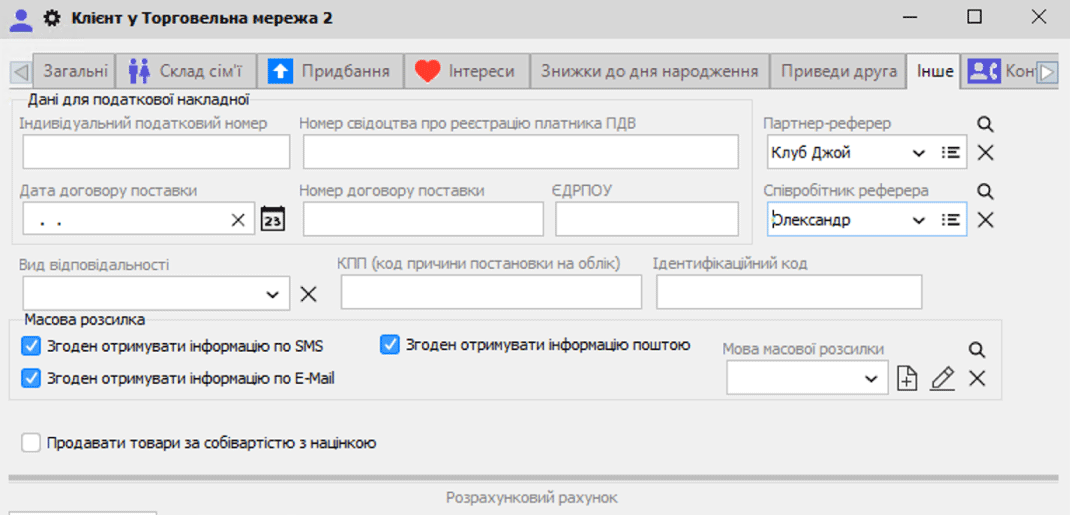
The Torgsoft “Referral Program” add-on lets you add partners and their employees, specify them in a customer record, and view the number of customers they have brought in in a report.
Prepare a list of partners
Add partners to the program. If their employees handle referrals, add those people too.
Record the referral
Ask the new customer who recommended the store. In their customer record, specify the relevant partner and, if needed, the employee.
Review referrals
The report shows how many customers each partner and their employees brought in. Review this data before discussing further cooperation.
Agree separately on payment terms with the partner: what qualifies for a reward, how the result is confirmed, and when payment is made. The number of customers brought in does not by itself determine the reward amount.
For referrals between customers, prepare promotion rules. For long-term work with partners, set up tracking for referral sources. If you use both scenarios, explain to sales staff how to distinguish between them and record referrals.
Confirm your scenario before launch
Review the pages for the “Bring a Friend” promotion and the “Referral Program”. For a consultation, prepare an example referral and your preferred reward terms.
Contact the orders department on Telegram at @torgsoft_sale or by phone at +38 (067) 558 37 84.
 Go back to the previous step