


Individual sales and clear rules for the team
In a large store, sales consultants help customers on the floor, while a shared cashier handles payments. To calculate extra pay and bonuses and assess performance, the owner needs to know who sold each specific item.
Alongside this, there is a daily task: communicating a new rule, a price change, or an inventory procedure to the team. For both processes, it is worth agreeing in advance what employees should record and how the manager will check the result.
How to link an item to a consultant
The Torgsoft option “Linking each item sold to a salesperson” lets you assign each sold item to the relevant consultant. This works for situations where several salespeople help a customer but there is only one checkout.
Prepare the barcodes
Each consultant needs their own unique barcode. Agree on how they will pass it to the cashier along with the item so employees are not mixed up.
Tag every item
Before selling each item, the cashier first scans the relevant salesperson’s barcode, then the item’s barcode. This sequence must be repeated for every item.
Review individual sales
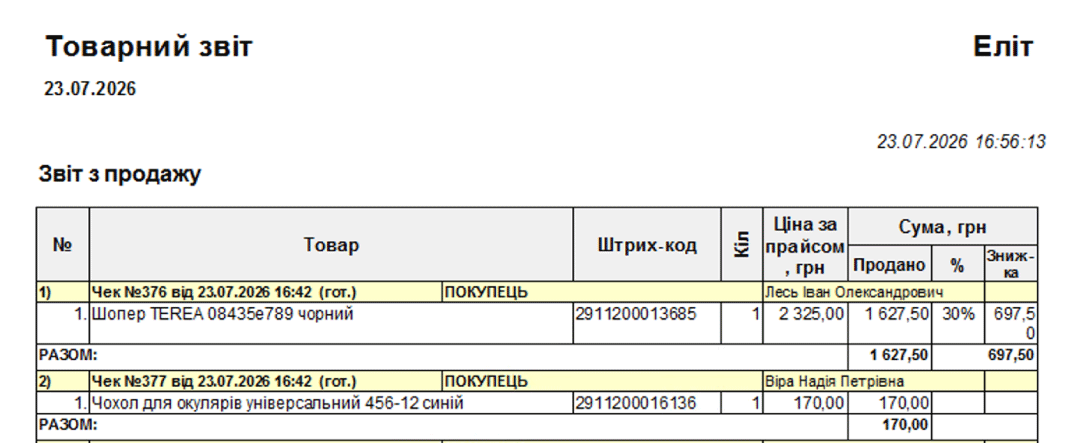
In the salesperson performance analysis, you can review the sales of items linked to them. Set a period and an accounting center to check the data.
For example, one consultant helped a customer choose shoes, while another helped them choose a care product. Before each of these items, the cashier scans the relevant employee’s code, so items in one receipt can be credited to different salespeople.
Agree on how to use the data for bonuses
Before starting, explain to the team which sales count toward extra pay and bonuses, and what period you will review. Agree separately on cases where several consultants helped a customer: the cashier needs to know whose barcode to scan.
We recommend walking through this scenario with a few items first and checking that they are linked to the right salespeople. Use individual sales data as a basis for discussing incentives, following the agreed rules.
How to share rules and check that staff have read them
Decide which messages require acknowledgment, such as a new inventory procedure, a price change, or a rule for working with customers. For each message, specify what is changing, when it takes effect, and whom it concerns.
Agree when an employee should read a message if they are serving a customer, and how to confirm they have read it. Keep a list of recipients and acknowledgments; contact separately anyone who has not yet responded. After an important instruction, ask employees to clarify anything they do not understand: a read acknowledgment alone does not show whether the task is clear.
If you plan to use the “Staff notifications” option for this, check with a Torgsoft manager before activation about how acknowledgment works, whether a message can be postponed, what log data is available, and what network requirements apply.
Prepare a workflow for your store
Write down how consultants pass items to the shared checkout and which staff messages require acknowledgment. Contact the Orders Department with this description: @torgsoft_sale or +38 (067) 558 37 84.
 Go back to the previous step