


Determine how much stock each location needs
A fast-selling item can run out before the next delivery, while another may sit in the warehouse for months. Across a retail chain, the same item often sells at different rates: a large store needs more stock, while a smaller one needs less.
To plan purchases based on data, a merchandise manager should first determine the required stock for each location. Torgsoft offers two related options for managing stock thresholds: «Minimum and maximum stock by warehouses» and «Automatic calculation of warehouse stock».
Same item, different store needs
For example, you might plan to keep ten units of an item at a large location and three at a smaller one. These figures are illustrative: set your own levels based on demand and the delivery schedule rather than copying them from another store.
The «Minimum and maximum stock by warehouses» option lets you set a minimum stock level separately for each warehouse. This allows you to account for the needs of different locations in your stock thresholds.
Two thresholds for planning
The minimum is a replenishment reference point. The maximum is the upper stock limit you consider appropriate for a location.
Before placing a new order, compare each store’s actual stock with its planned thresholds. If one location has too much of an item while another is short, consider transferring stock between them as a possible alternative to purchasing more.
How to use sales history
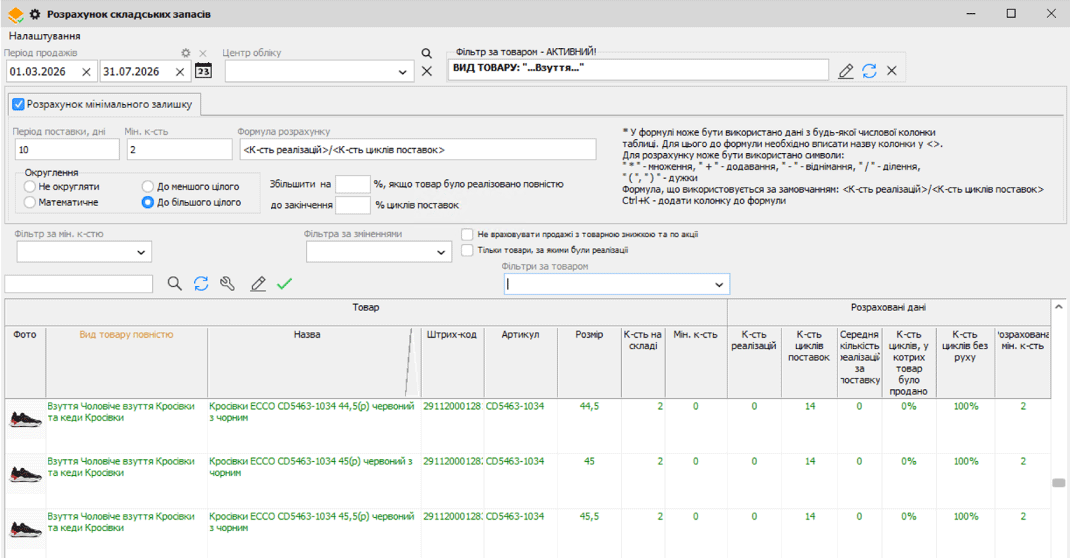
Once you have accumulated data, you do not have to calculate every threshold manually. The «Automatic calculation of warehouse stock» option calculates the minimum stock based on sales and the delivery period. Calculating the maximum stock also requires the warehouse stock option to be enabled, minimum stock levels to be configured separately for each warehouse, an added dynamic maximum stock attribute and the corresponding column in the calculation.
Check the source data
Reconcile recorded stock with the actual count. Choose a sales period that reflects usual demand and specify the delivery frequency. If the «Minimum and maximum stock by warehouses» option is enabled, you must select the specific location in the «Accounting centre» field for the calculation.
Separate promotional demand
If needed, you can exclude sales made with an item discount or promotion. Delivery cycles that included such sales are also excluded when calculating the number of delivery cycles.
Review the result
The calculation shows the quantity of each item in stock, sales and the calculated minimum. Check the suggested values; you can manually adjust the calculated minimum quantity and save it for selected items.
Calculating stock thresholds is a separate step in purchase preparation. After checking the values, create a supplier order, taking current stock and store needs into account.
When the result needs extra attention
For a new item or one with a short sales history, there may not be enough data to make a confident decision. A promotional spike should also be assessed separately. Do not apply calculated values to every location without checking them: compare them with usual demand, available space and the actual delivery schedule.
Set stock thresholds for your retail chain
Start with a few familiar items: compare store needs, check sales history and review the calculation. You can ask questions about enabling the options on Telegram at @torgsoft_sale or by phone at +38 (067) 558 37 84.
 Go back to the previous step