


You can search for and compare books at the online stores Ranok, KSD, A-BA-BA-HA-LA-MA-HA, Old Lion Publishing House, BookChef, Vivat, and Laboratoria. Before paying, check the specific edition, its format, availability, and the full order total. For a preorder, find out separately when the seller expects to receive the book and whether it will delay shipping of other items in your cart.
Booksellers should compare offers for the same editions, quantities, and delivery methods. If you are buying stock for resale, first agree with the seller on the price, available quantity, and documents they will provide. A retail product listing by itself does not confirm wholesale purchase terms.
What you can check at seven stores
Each example below helps you check a different part of an order. The terms of a specific presale or the details of an individual book apply only to that offer.
Ranok: electronic or printed format
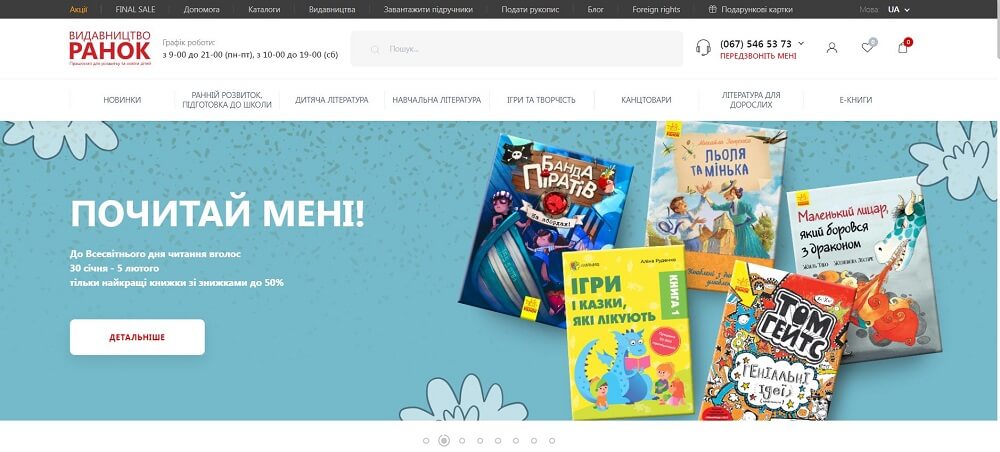
In the Ranok catalog, the workbook “NUS Geography. Grade 7. Diagnostic Assessment Workbook” is marked “ELECTRONIC VERSION.” For a store owner ordering printed educational materials, this is an important detail: check the format of each item before adding it to your cart.
Under Ranok’s terms, an e-book is provided for personal use; transferring or distributing it to third parties is prohibited. A bookseller must separately agree with the publisher on whether they may sell electronic editions to their customers. For personal reading, check how the book can be accessed and opened, as well as any printing and copying restrictions, before paying.
KSD: ISBN for a specific edition
The product listing for “Where There Is No God” by Max Kidruk gives the ISBN 978-617-12-4950-9. An ISBN is a number you can use to verify the edition you need. Add it to your purchasing list alongside the title and author, then check the number on the book when it arrives.
Check the price and available quantity separately before paying. The ISBN helps identify an edition, but it does not confirm how many copies the seller can ship.
A-BA-BA-HA-LA-MA-HA: language, edition, and contact channel

The listing for “Harry Potter and the Half-Blood Prince. Large-Format Illustrated Edition” specifies Ukrainian as the language and gives the ISBN 978-617-585-436-5. These details help distinguish the book you need from other editions of the same work. Before placing a bulk order, confirm the number of copies and possible shipping time.
The store website warns of possible phone connection problems and asks customers to get in touch by email. If you cannot reach them by phone, email the title, ISBN, quantity, and your questions about the order.
Old Lion Publishing House: payment and presale wait time
According to the presale terms for Yurii Izdryk’s signed book “Take”, the order must be paid for online by bank card within 24 hours of being placed. Shipping and collection begin after the book arrives from the printing house. The page gives a period from September 2 to November 3, without a year, so check with the store before paying whether this offer is still valid.
Under the terms described, other editions in this order also wait for the book from the printing house. Before placing your own preorder, check whether the offer is currently valid, whether advance payment is required, the payment deadline, and whether other items will wait to ship together. If you need the other books sooner, compare the cost of placing two separate orders. The terms of this example do not determine the payment and shipping procedures for all orders from the store.
BookChef: books from multiple publishers
BookChef says it sells books from its own publishing house and other publishers. When searching, check the publisher in each product listing, especially if you need a particular design, translation, or series.
For a purchase, make a list of specific editions and ask the seller to confirm the available quantity. A general description of the selection does not confirm that every book on your list is in stock.
Vivat: orders containing “The Odyssey” ship after all items arrive

The listing for Homer’s “The Odyssey,” translated by Borys Ten states three conditions: the arrival date is still being clarified, preorders are available only with online payment, and the order ships after all items have arrived. The store does not split this order.
If you add books needed by a certain date to your cart, first find out whether they can be received as a separate order. If the arrival date is uncertain, do not plan to sell the preorder book on a specific date.
Laboratoria: payment method and shipping time
The Laboratoria payment and delivery terms describe online payment through WayForPay using Visa and MasterCard, including through Google Pay and Apple Pay. Before paying, check which payment methods are available for your order and confirm the final total.
The page also warns that shipping may take longer than usual. If you need the books for a planned sale or event, ask the seller when they may hand the parcel to the carrier. Account for order preparation time and transit time separately.
How to compare offers before paying
A bookstore owner or purchasing employee can use one table to track all offers. Fill it out for the same list of books and record the date you checked: prices, quantities, and terms may change before payment.
| What to compare | What to record | What to confirm with the seller |
|---|---|---|
| Specific edition | Title, author, ISBN, publisher, language, format, and translator if relevant | Whether the book offered matches your list |
| Quantity and availability | Quantity needed and status shown in the listing | How many copies the seller can ship in one order |
| Preorder | Payment terms, expected arrival, and shipping procedure | Whether other items will have to wait and whether they can be ordered separately |
| Full total | Book prices, delivery, and any fees paid by the buyer | Whether the quoted price applies to your quantity and payment method |
| Delivery timeframe | Possible shipping date and the carrier’s estimated timeframe | When the seller will hand the ready order to the carrier |
| Documents and contact | Order number, correspondence, proof of payment, and agreed list of documents | How to get in touch if the parcel contents or edition do not match the order |
For stock purchased for resale, ask separately about the terms for working with a bookstore. Agree on the buyer’s details, price, quantity, and documents before transferring money. Keep the seller’s reply with the list of editions ordered.
What to do after placing and receiving an order
- After placing the order, save the order number, book list, and total. Check the address, pickup location, and recipient’s contact details.
- After paying, save the payment confirmation. If the seller set a payment deadline, meet it or ask whether the order will remain reserved.
- Before the expected shipping date, check the status if the seller has not sent an update. For a preorder, ask the seller to notify you if the expected arrival changes.
- When you receive the order, check the quantity, ISBN, language, format, and condition of the copies against the order and accompanying documents.
- If anything does not match, photograph the book and packaging, note the order number, and contact the seller through their stated channel.
- After checking the delivery, enter the books actually received into your inventory records. If some of the order has not arrived, leave those items on the list of expected deliveries.
How to calculate the margin on a batch of books
Example for illustration: a bookstore buys five books at UAH 280 each and sells all five at UAH 400 each, with no discounts. These amounts are for the calculation only; they do not describe the prices or results of the stores featured here.
- Revenue: 5 × 400 = UAH 2,000.
- Purchase cost: 5 × 280 = UAH 1,400.
- Difference between revenue and purchase cost: 2,000 − 1,400 = UAH 600.
- Gross margin before other expenses: 600 ÷ 2,000 × 100% = 30%.
This example does not include taxes, payment fees, packaging, delivery, or other expenses. To assess the purchase, the owner must add their own costs. For example, if delivery for the batch costs an illustrative UAH 100 and the bookstore pays it, UAH 500 remains after the purchase and delivery: 2,000 − 1,400 − 100. Any other expenses still need to be deducted. Revenue of UAH 2,000 will arise only after all five copies have been sold.
Book searches, stock, and website integration in Torgsoft
When receiving books in Torgsoft, an employee can search for an item by barcode, by item code, or by barcode, item code, and name. Set the search method in “Settings — Parameters — Inventory,” in the “Product search” field. The search settings guide can help you choose an option for your records. The employee checks the edition’s ISBN separately; these features do not provide a dedicated search for bibliographic data by ISBN.
In “Warehouse — Stock status,” an employee can see the recorded quantity, sale price, and cost of goods. The Torgsoft page for bookstores also describes tracking stock at the warehouse and retail locations. Check your own stock before purchasing, then confirm that the recorded quantity matches the copies received. You need to confirm availability with the third-party seller.
You can connect the paid “Online Store Synchronization” option for your own website. It requires a Torgsoft Ultra or Terminal license: the program sends products, attributes, photos, prices, and stock levels, while the website returns orders for picking and further processing by a manager. Torgsoft is the primary recordkeeping system. The website must support receiving, processing, and sending exchange files; a developer’s help is needed to set up the website side, as explained in the official guide. To enter additional product attributes, after activating the option, open “Settings — Parameters — Product,” enable “Use additional product attributes,” and restart the program. Before launch, the manager and developer must check data transfer and receipt of a test order on the specific website.


 Go back to the previous step