


Fertilizers, seeds, and animal feed in one Torgsoft database
Torgsoft keeps agro products and animal feed in a shared database. The assortment is divided by product types, manufacturers, and required characteristics, while inventory, checkout, suppliers, prices, customers, and finances work in one system.
The program is suitable for a store or warehouse that sells fertilizers, seeds, plant care products, feed for poultry and farm animals, feed additives, and related goods wholesale and retail.
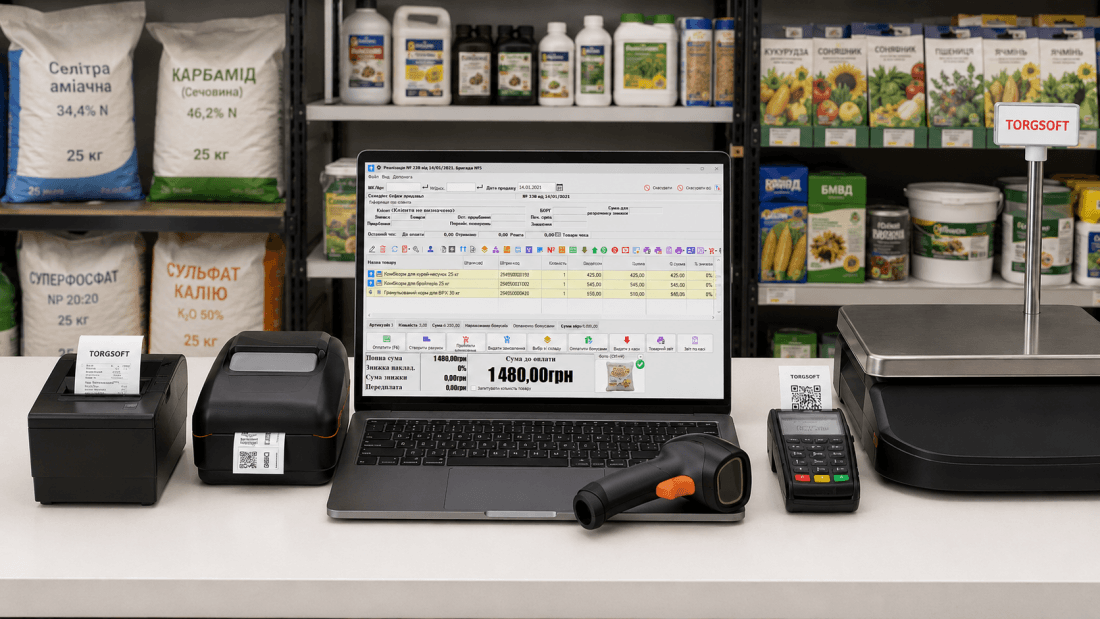
Scenarios based on a real agro market implementation
The page is based on many years of experience automating a garden and vegetable garden goods store. The business started with one workstation and later expanded the system to four workstations in a local network and connected «Synchronization with an online store», «Torgsoft mobile app», «Software RRO», and «Integration with a bank terminal».
Product list, barcodes, and labels
A product type tree, accounting for several barcodes for one item, a scanner, receipt and label printers, price tag templates, and quantity request during sale were configured.
Several checkouts and a shared database
The number of workstations was gradually increased to four. Separate users, cash desks, and access rights were created for sellers, and product photos are stored in a shared directory.
Website, invoices, and deliveries
Torgsoft became the source of product data for the online store. Orders are processed through «Sales with invoice issuance», and shipments are arranged through «Integration with Nova Poshta» and «Integration with Ukrposhta».
PRRO, terminal, and backup scenarios
PRRO, a bank terminal, merchants, payments, and returns were configured at the checkouts. Archiving and access control are used to preserve data.
Separate product areas in one system
In Torgsoft, goods are classified by product types, manufacturers, and other directories. For a mixed store, separate branches and subgroups can be created so that the cashier quickly finds items and the owner receives reports for each area.
Agro products
- mineral and organic fertilizers;
- seeds and planting material;
- soils, substrates, and agrofibre;
- plant care products;
- garden tools and related goods.
Feed and goods for animals
- compound feed for poultry;
- feed for cattle and small ruminants;
- grain mixtures and feed additives;
- mineral and vitamin complexes;
- related goods for keeping animals.
Product accounting logic
Each item has its own card, barcodes, accounting unit, purchase and selling price, stock balance, supplier, and movement history.
Characteristics for a specific product group
The «Dynamic product characteristics» panel allows you to create additional parameters for the selected product type. Numeric, string, logical fields, date, text, and directories of allowed values are supported. A parameter can be made mandatory. This extended scenario is available in Torgsoft Ultra and Torgsoft Terminal.
Example for fertilizers and seeds
- fertilizer type and purpose;
- active ingredient or composition;
- crop and season of use;
- weight, volume, or number of seeds;
- manufacturer, article number, and supplier code;
- production date or expiration date.
Example for feed
- animal species and age group;
- feed type and release form;
- package weight or weight unit;
- composition and purpose;
- manufacturer and batch;
- expiration date and certificate number.
This reduces the risk of creating a product without critical data. For example, for feed you can require animal species and package weight, and for fertilizer — type, packaging, and manufacturer.
Business process from delivery to repeat order
Build a product tree
Create product types for fertilizers, seeds, feed, and related groups. For each branch, define the name, accounting unit, markup, discount limit, and required characteristics.
Load the product list
New goods are entered during receipt or imported from Excel. A manufacturer barcode, own barcode, article number, and additional codes can be linked to an item if the manufacturer has changed the marking.
Receive the delivery
The incoming invoice records the supplier, quantity, purchase price, and expenses that affect cost. The document increases the stock balance and creates payables to the supplier.
Calculate selling prices
The price is formed by the markup of the product type or a specific item. For imported goods, you can use the price equivalent in a foreign currency and recalculate it at the current exchange rate. Wholesale rules are configured through «Wholesale price policy».
Prepare packaging and labels
For factory packages, existing barcodes are used. For own packaging, the program prints labels with quantity or weight, price, and barcode according to the selected scenario.
Make the sale
The cashier scans the product, enters or confirms the quantity, accepts payment, and generates a fiscal receipt. The stock balance decreases automatically, and the operation is included in cash and product reports.
Process the order and delivery
For wholesale and online customers, invoices, outgoing invoices, and payments are created. Carrier integrations help create shipments and save the waybill number in the document.
Analyze sales and stock
The owner reviews sales quantity and amount by product types, manufacturers, and suppliers, turnover, non-moving goods, cost, profit, and the need for a new order.
Different scenarios for seeds, fertilizers, and feed
Factory packaging
A bag of compound feed, a canister of product, or a pack of seeds is accounted for as a separate product. Sale is carried out using the manufacturer barcode or own label.
Packages with a defined quantity
The «Accounting and sale of piece goods with measure» option sets the number of units in a package and prints the required number of labels. After scanning the label, Torgsoft adds the specified quantity of the base product to the sale.
Large package into smaller packaging
For a scenario such as «1000 kg fertilizer big bag → 1 kg packages», kitting or auto-kitting is used in Torgsoft Ultra or Torgsoft Terminal. The kit composition is configured so that the corresponding share is deducted from the large unit.
Weight-based product
For sale by actual weight, «Integration with scales at checkout» is connected. For preliminary packaging on scales with receipt printing, the «Packaging and labeling of weight-based goods | 1-year license» option is used.
There is no universal operation for arbitrary conversion. The scenario is determined by the accounting method: packaging of piece goods, weight-based packaging, kitting, or creating a separate item. The scheme must be configured before work starts so that stock balances and cost are stored correctly.
A product discount and the «Markdown» attribute can be set for the product. In this case, the program warns the cashier about a marked-down product and does not add other customer discounts to it. The quantity of defective goods and settlements with the supplier must be processed with the appropriate warehouse documents.
What helps work with a large product list
Several barcodes
One item can have several barcodes if the supplier or manufacturer has changed the package code.
Quantity request
For the selected product type, you can enable a quantity request during sale. The cashier sees the stock balance and enters the actual quantity sold.
Quality certificates
The program keeps a list of certificates, their numbers, and expiration dates. This helps find goods with valid, expired, or missing certificates.
Reports by product types
Sales can be grouped by the full product type structure to separately see specific crops, varieties, feed types, and packaging.
Supplier order
The program analyzes sales, deliveries, and stock balances and helps prepare an order to the required supplier. To replenish stock, you can use «Automatic calculation of warehouse stock» and «Minimum and maximum stock balances by warehouses».
Inventory count
The actual quantity is checked against the accounting statement. A scanner or mobile tool reduces manual product entry.
Wholesale customers, online store, and delivery
Synchronization with an online store
«Synchronization with an online store» transfers product data, prices, stock balances, manufacturers, and photos to the website within the configured format. Product management is maintained in Torgsoft so that the website and warehouse use consistent data. If the website has not yet been created, «Torgsoft Online Market» can be considered.
Orders from remote customers
Orders are loaded into the program, where an employee checks the buyer, goods, payment, and execution status, then creates shipment documents.
Sales with invoice issuance
For wholesale or remote sales, an invoice, outgoing invoice, prepayment, customer debt, and printed documents are generated.
Delivery and messages
«Integration with Nova Poshta» and «Integration with Ukrposhta» create shipments from document data. The waybill number can be used in the template of the «Mass customer mailings» option.
Set for a store or warehouse
Torgsoft program
Product list, receipt, warehouse, sale, invoices, cash desks, suppliers, customers, money, and reports in one database.
Barcode scanner
Receiving, sale, product search, and inventory count.
Label printer
Price tags, own barcodes, and labels for packaging.
Scales
«Integration with scales at checkout» for sale by actual weight or «Packaging and labeling of weight-based goods» for preliminary package labeling.
Software RRO
Fiscal receipts, returns, and work with several cash desks. For hardware RRO, «Integration with a fiscal registrar» is used.
Integration with a bank terminal
Transferring the payment amount and controlling the transaction result.
Torgsoft mobile app
Operational control, scanning, and selected warehouse operations.
Synchronization with an online store
Exchange of goods, prices, stock balances, and orders. To launch a ready-made website, you can use «Torgsoft Online Market».
Delivery services
«Integration with Nova Poshta» and «Integration with Ukrposhta» create shipments from invoice or delivery note data.
Cloud data archive
Regular saving of a database backup outside the store.
Which Torgsoft version to choose
The number of product groups does not determine the license type. The version is chosen based on the number of workstations, connection method, and required business processes.
Torgsoft Start
For one small store with basic product accounting, receipt, sale, returns, write-off, inventory count, and piece goods packaging. Some integrations are connected as separate options.
Torgsoft Ultra
For a local network, several workstations, wholesale operations, kitting, extended analytics, an online store, work with invoices, deliveries, and staff.
Torgsoft Terminal
For remote work via the internet, when cash desks, a warehouse, or retail outlets connect to one database on a server.
No. Both areas are maintained in one database as different product types. Additional licenses are required for new workstations or functions, not for a new assortment category.
What must be defined before launch
Before loading goods, you need to decide which items are sold by piece, by weight, as a whole package, or in own packaging. The product list structure, barcodes, and equipment depend on this.
Torgsoft stores product data, documents, certificates, and operation history. The owner is responsible for correct product classification, storage conditions, permissibility of packaging, and mandatory labeling.
It is necessary to define in advance which products and categories are transferred to the website. Main changes to the product list should be made in Torgsoft so that synchronization does not create discrepancies.
Answers for an agro store and feed warehouse
Yes. Goods are divided by types and subtypes, while the warehouse, checkout, suppliers, customers, and finances remain shared.
Yes. The cashier adds both items to one sale, the program writes them off from stock and generates a shared payment and fiscal receipt.
Another barcode can be added to the existing product card. Old and new packages will be sold as one accounting item if the product itself has not changed.
Yes. Dynamic characteristics are linked to the product type, so each branch has its own set of parameters and mandatory fields.
Yes. For packages with a defined quantity, «Accounting and sale of piece goods with measure» is used: the program creates a label with the quantity, and during sale it writes off the specified quantity of the base product.
The expiration date can be stored as a characteristic or used in packaging scenarios. Quality certificates are maintained as a separate list with a number and expiration date.
Yes. Retail prices are formed in basic accounting, and complex wholesale price rules are connected through the «Wholesale price policy» option in the corresponding license.
Yes. The «Synchronization with an online store» option transfers an agreed set of product data and receives orders according to the configured exchange format.
Yes. In a local network, Torgsoft Ultra is used with the required number of workstations. For remote connections via the internet, Torgsoft Terminal is considered.
Yes. For this, «Software RRO», «Integration with a bank terminal», and «Integration with scales at checkout» are activated. Compatibility of specific equipment models is checked before purchase.
We will show accounting using your assortment as an example
During the consultation, you can review the product structure, packaging, receipt, retail and wholesale prices, sale, online orders, delivery, equipment, and required license.
 Go back to the previous step